Running a Magento store means operating one of the most powerful — and most complex — ecommerce platforms available. Whether you’re on the open-source Magento 2 or the enterprise-grade Adobe Commerce, a thorough magento store audit is essential to ensure your site performs at its peak, converts visitors into buyers, and stays secure against evolving threats. Unlike simpler platforms, Magento’s deep customizability introduces layers of potential performance bottlenecks, security risks, and conversion barriers that demand systematic review.
This complete checklist walks you through every critical area of a Magento store audit in 2026 — from server-side caching and database optimization to checkout flow improvements and security patch management. Whether you’re a store owner, a Magento developer, or an agency managing multiple storefronts, use this guide to identify what’s holding your store back and build a clear action plan for improvement.
Why Magento Stores Need a Dedicated Audit Approach
Magento is not Shopify. It’s not WooCommerce. It’s a self-hosted, highly extensible platform that gives you extraordinary control — and extraordinary responsibility. A magento store audit must account for infrastructure decisions, custom code quality, third-party extension conflicts, and server configuration in ways that hosted platforms simply don’t require.
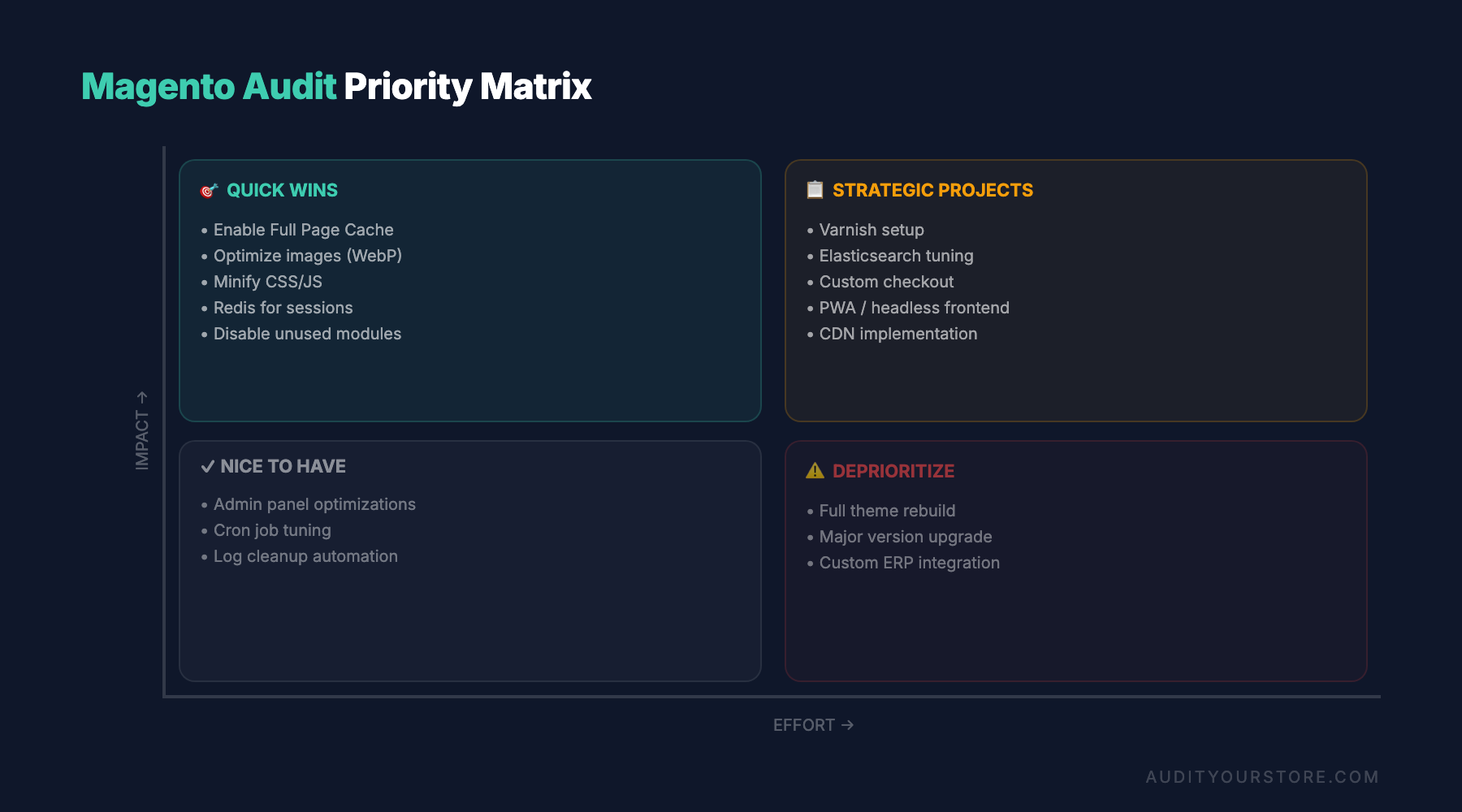
| Audit Area | Priority | Typical Impact | Complexity |
|---|---|---|---|
| Varnish/FPC caching | 🔴 Critical | 50-80% faster TTFB | Medium |
| Extension audit | 🔴 Critical | 20-40% speed gain | High |
| Database optimization | 🟡 High | 15-30% query speed | Medium |
| Image optimization | 🟡 High | 30-50% page weight | Low |
| Security patches | 🔴 Critical | Risk mitigation | Medium |
| Checkout UX | 🟡 High | +10-25% completion | Medium |
| Elasticsearch tuning | 🟢 Medium | 2-5x search speed | Medium |
Here’s what makes Magento audits fundamentally different:
- Infrastructure ownership: You manage (or delegate) server configuration, caching layers, CDN setup, and SSL termination. Misconfigurations at any layer cascade into performance and security problems.
- Extension ecosystem complexity: The average Magento store runs 20-40 third-party extensions. Each one can introduce database queries, layout XML overrides, JavaScript bloat, and plugin conflicts that degrade performance.
- Theme architecture: Magento’s fallback-based theme system, RequireJS dependency management, and LESS/CSS compilation pipeline create unique frontend performance challenges.
- Multi-store scalability: Many Magento installations serve multiple storefronts, languages, and currencies from a single codebase — multiplying the impact of any performance or security issue.
If you’ve already completed a Shopify store audit or a WooCommerce store audit for other properties in your portfolio, you’ll find that Magento demands a deeper, more technical approach. The payoff, however, is proportionally greater — because the platform’s ceiling for performance and conversion optimization is exceptionally high.
Server Configuration and Caching: The Foundation of Magento Performance
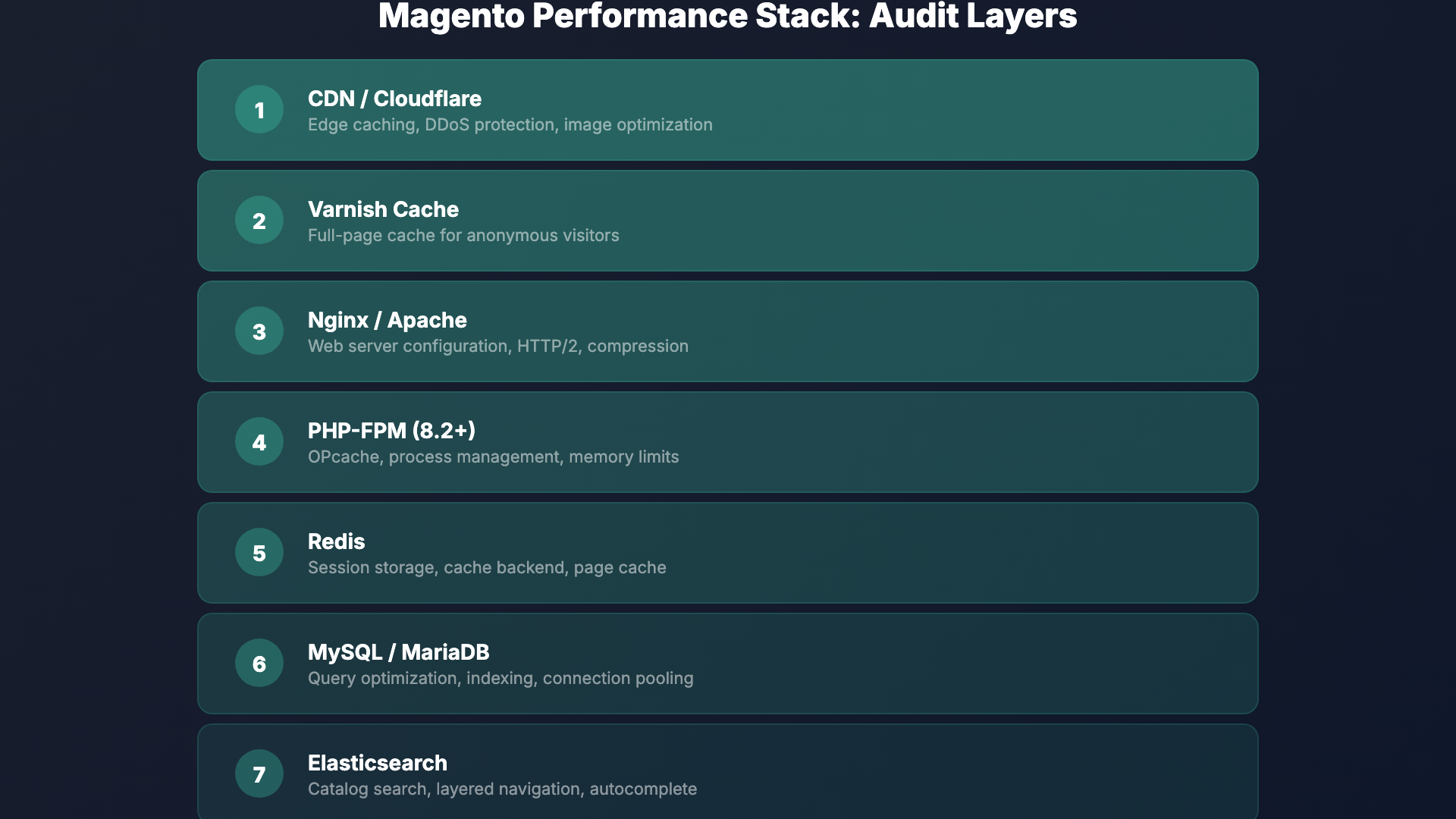
Before you examine a single product page or checkout flow, your magento store audit must start at the server level. Magento 2’s performance is heavily dependent on proper server-side configuration, and this is where many stores leave the most significant gains on the table.
Varnish Cache Configuration
Varnish is Magento’s recommended HTTP accelerator, and it’s non-negotiable for production stores handling any meaningful traffic. During your audit, verify the following:
- Varnish is active and properly configured: Check that Magento is generating the correct VCL (Varnish Configuration Language) file and that Varnish is the primary caching layer in front of your web server, not just installed but unused.
- Cache hit ratios: Use
varnishstatorvarnishlogto examine your hit rate. A well-configured Magento store should see Varnish hit rates above 85-90% for cacheable pages. Anything below 70% signals misconfigured cache rules or excessive cache invalidation. - TTL (Time-to-Live) settings: Ensure your cache TTLs are appropriate. Static content pages should cache for hours or days, while dynamic elements use Edge Side Includes (ESI) to stay fresh without invalidating the entire page cache.
- Health checks: Confirm that Varnish health checks are configured to detect backend failures and serve stale content gracefully during brief outages.
Full-Page Cache (FPC)
Magento 2 ships with a built-in full-page cache that can use either the filesystem or Redis as its backend. For production environments, Redis is strongly preferred. During your audit:
- Verify that FPC is enabled in Stores > Configuration > Advanced > System > Full Page Cache.
- Confirm Redis is configured as the FPC backend (not file system) for multi-server environments.
- Check for pages that are unexpectedly bypassing FPC — common culprits include poorly coded extensions that set
cacheable="false"in layout XML, which disables caching for the entire page, not just their block. - Review cache invalidation patterns. Frequent, unnecessary cache flushes (often triggered by catalog updates or cron jobs) can keep your store perpetually uncached during peak hours.
Redis and Session Management
Redis should be handling both your cache backend and session storage. Audit these specifics:
- Use separate Redis databases (or separate Redis instances) for cache, FPC, and sessions to prevent eviction policies from clearing session data.
- Monitor Redis memory usage and eviction rates. If Redis is evicting cache entries frequently, you need more memory allocation or better cache segmentation.
- Ensure session persistence is reliable — lost sessions mean lost carts, which directly impacts conversion rates.
Audit checkpoint: A Magento store running without Varnish and Redis properly configured is operating at a fraction of its potential speed. These aren’t optional optimizations — they’re baseline requirements for any production Magento 2 store in 2026.
Extension Audit: Finding the Hidden Performance Killers
Third-party extensions are both Magento’s greatest strength and its most common source of problems. A rigorous extension audit is a cornerstone of any serious magento store audit, and it requires both automated tooling and manual review.
Identifying Problematic Extensions
Start by generating a complete list of installed extensions using bin/magento module:status. Then systematically evaluate each one:
- Performance profiling: Use tools like Blackfire.io, New Relic, or Magento’s built-in profiler to identify extensions that add excessive database queries, slow observers, or heavy JavaScript to every page load.
- Layout XML impact: Check each extension’s layout XML files for
cacheable="false"declarations. A single instance of this attribute on any block in a page’s layout will disable full-page caching for that entire page — and some poorly written extensions apply it site-wide. - Plugin (interceptor) chains: Magento 2’s plugin system allows extensions to hook into virtually any public method. Audit your
di.xmlfiles to identify long plugin chains on critical paths likecheckout,catalog, andquoteoperations. Each plugin adds overhead. - Event observer overhead: List all active observers with their events. Extensions that observe high-frequency events like
controller_action_predispatchorcatalog_product_load_afterwith heavy logic can silently degrade every request.
Extension Quality Checklist
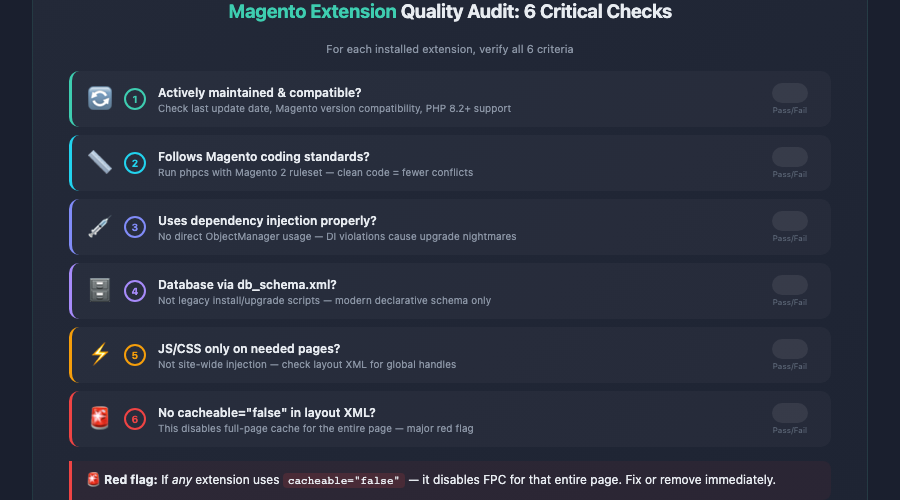
- Is the extension actively maintained and compatible with your current Magento version?
- Does it follow Magento’s coding standards (check with
phpcsusing the Magento 2 ruleset)? - Does it use dependency injection properly, or does it rely on the deprecated ObjectManager directly?
- Are its database schema changes properly declared in
db_schema.xml(declarative schema) rather than legacy install/upgrade scripts? - Does it add unnecessary JavaScript or CSS to pages where it isn’t needed?
- Has it been tested for compatibility with PHP 8.2+ and the latest Magento patches?
This is where Magento differs dramatically from platforms like Shopify, where apps run in sandboxed environments with limited ability to affect core performance. In Magento, a single poorly written extension can bring an entire store to its knees. If your audit uncovers extensions that fail multiple quality checks, seriously consider replacing them or commissioning custom alternatives.
Removing Unused Extensions
Many Magento stores accumulate extensions over the years that are disabled but never fully removed. Disabled modules still consume resources during compilation and deployment. During your audit, identify and fully remove (via Composer) any modules that are no longer needed. Run bin/magento setup:di:compile afterward to regenerate the dependency injection configuration cleanly.
Theme Performance and Frontend Optimization
Magento’s frontend has historically been one of its weakest areas from a performance standpoint. The default Luma theme, while functional, is built on a heavy RequireJS and KnockoutJS foundation that requires deliberate optimization. If you’re running a custom theme, the potential for both improvement and degradation is even greater.
JavaScript Optimization
JavaScript is typically the single biggest frontend performance bottleneck on Magento stores. Audit these areas:
- JS bundling and minification: Ensure that JavaScript minification is enabled in production mode (Stores > Configuration > Advanced > Developer > JavaScript Settings). Consider advanced bundling strategies or critical-path JS extraction to reduce initial payload sizes.
- RequireJS optimization: Review your
requirejs-config.jsfiles across the theme and extensions. Identify modules loaded on every page that are only needed on specific pages (e.g., loading the entire checkout JS bundle on product pages). - Deferred and async loading: Implement deferred loading for non-critical JavaScript. Third-party scripts like analytics, chat widgets, and remarketing pixels should never block the initial render.
- Hyva Theme consideration: In 2026, the Hyva theme has matured into a leading alternative to Luma-based themes. If your audit reveals deep frontend performance issues with your current RequireJS/KnockoutJS setup, evaluating a migration to Hyva (which uses Alpine.js and Tailwind CSS) may yield the largest single performance improvement available to your store.
CSS and Critical Rendering Path
- Enable CSS minification and merging in production mode.
- Audit your LESS compilation output for unused styles. Magento themes often include thousands of lines of CSS that apply to pages the visitor never sees.
- Implement critical CSS extraction so that above-the-fold content renders without waiting for the full stylesheet to download.
- Check for render-blocking resources using Google PageSpeed Insights or Lighthouse, and address each one systematically.
Image Optimization
Magento 2 includes built-in image resizing, but many stores don’t take full advantage of modern image formats and lazy loading:
- Convert product and CMS images to WebP format (with JPEG/PNG fallbacks for older browsers).
- Implement lazy loading for below-the-fold images — especially on category pages with dozens of product thumbnails.
- Audit your media storage. Over time, Magento’s
pub/media/catalog/product/cachedirectory can balloon to tens of gigabytes. Clear and regenerate the image cache periodically. - Use a CDN (such as Fastly, Cloudflare, or AWS CloudFront) to serve all static assets and media files from edge locations closest to your customers.
Database Optimization, Indexing, and Elasticsearch
Magento is a database-intensive platform. A typical Magento 2 installation with 10,000+ SKUs can have a MySQL/MariaDB database exceeding several gigabytes, with hundreds of tables and complex query patterns. Database health is a critical — and often neglected — component of a magento store audit.
MySQL / MariaDB Optimization
- Query analysis: Enable the slow query log and analyze it for recurring expensive queries. Common offenders include EAV (Entity-Attribute-Value) queries on large catalogs, unoptimized catalog rule processing, and report generation queries running during peak traffic.
- InnoDB buffer pool: The
innodb_buffer_pool_sizeshould be set to approximately 70-80% of available RAM on a dedicated database server. This single setting has the largest impact on MySQL performance for Magento workloads. - Table maintenance: Run
OPTIMIZE TABLEon large tables periodically, especially after bulk imports or deletions. Fragmented tables slow down queries and consume more disk space. - Connection pooling: For high-traffic stores, ensure your database connections are managed efficiently. Magento’s persistent connections setting and connection limits should match your server’s capacity.
Indexer Management
Magento’s indexers transform raw data (products, categories, prices, inventory) into optimized structures for fast frontend queries. Misconfigured indexers are one of the most common causes of both performance issues and stale catalog data:
- Check indexer modes: Run
bin/magento indexer:infoandbin/magento indexer:statusto see which indexers are in “Update on Save” vs. “Update by Schedule” mode. For stores with more than a few hundred products, all indexers should run on schedule — “Update on Save” causes admin operations to trigger synchronous reindexing, which slows down the admin panel and can cause timeout errors during bulk operations. - Cron job health: Indexers running on schedule depend on Magento’s cron system. Verify that cron is properly configured, running reliably, and not accumulating failed jobs. Check the
cron_scheduletable for stuck or failed entries. - Indexer performance: If a full reindex takes more than 30 minutes for your catalog size, investigate. Common causes include excessive custom attributes, complex catalog price rules, and large numbers of customer groups.
Flat Catalog Settings
Magento’s flat catalog feature was historically used to bypass the EAV model’s query complexity by creating flattened database tables for categories and products. In Magento 2.4+ with Elasticsearch (now OpenSearch) handling catalog search and layered navigation, flat catalog tables are largely unnecessary and can actually cause issues:
- Flat catalog tables increase reindex time and database size.
- They can introduce data inconsistencies when they fall out of sync with EAV tables.
- With Elasticsearch/OpenSearch handling frontend queries, the performance benefit that flat catalogs once provided is minimal.
During your audit, consider disabling flat catalog for both categories and products if your store uses Elasticsearch/OpenSearch for search and layered navigation. Test thoroughly in a staging environment first, as some legacy extensions may still depend on flat tables.
Elasticsearch / OpenSearch Configuration
Since Magento 2.4, Elasticsearch (and its successor, OpenSearch) is a mandatory requirement for catalog search. Audit your search infrastructure:
- Version compatibility: Ensure you’re running a supported version of Elasticsearch or OpenSearch for your Magento release. Adobe Commerce 2.4.6+ supports OpenSearch 2.x, while older versions may require Elasticsearch 7.x.
- Index health: Check cluster health, index sizes, and shard allocation. A “yellow” or “red” cluster status indicates problems that will affect search functionality and catalog performance.
- Search relevance: Test common search terms and evaluate the quality of results. Configure synonyms, stop words, and attribute weighting to improve search accuracy — poor search results directly harm conversion rates.
- Autocomplete and suggestions: Evaluate the speed and relevance of search autocomplete. Modern shoppers expect instant, accurate suggestions as they type.
Checkout Optimization on Magento: Reducing Cart Abandonment
Magento’s checkout process is powerful and flexible, but its default implementation is more complex than what Shopify offers out of the box. Since checkout is the most conversion-critical page on any ecommerce store, a magento store audit must dedicate significant attention to optimizing this flow. For a broader perspective on conversion optimization across your entire funnel, see our ecommerce CRO audit guide.
Checkout Performance
- Checkout page load time: The Magento 2 checkout uses KnockoutJS templates and multiple AJAX calls to load shipping methods, payment methods, and customer data. Profile the checkout page specifically — it often loads significantly slower than catalog pages because much of its content is uncacheable and dynamically assembled.
- Reduce API calls: Each step of the default checkout triggers API requests. Audit these calls for redundancy and latency. Some extensions add additional API requests for validation, tax calculation, or address verification that can add seconds to each step transition.
- Payment gateway latency: Test the response time of your payment gateway integration. A slow payment processing response is one of the leading causes of checkout abandonment — customers assume the transaction has failed and leave.
Checkout UX Improvements
- Guest checkout prominence: Ensure guest checkout is enabled and prominently offered. Forcing account creation before purchase is one of the most reliable ways to kill conversions.
- Form field optimization: Audit the number of fields in your checkout forms. Remove any that aren’t strictly necessary. Each additional field adds friction and increases abandonment probability.
- Progress indicators: Magento’s two-step checkout (shipping, then payment) should clearly indicate progress. Consider whether a one-step checkout extension might reduce friction for your specific customer base.
- Error handling: Test how errors are displayed during checkout. Vague error messages like “An error occurred” without specific guidance frustrate customers and lead to abandonment.
- Mobile checkout experience: Test the entire checkout flow on multiple mobile devices. Ensure form fields are appropriately sized, buttons are easily tappable, and the keyboard type switches correctly for email, phone, and ZIP code fields.
- Shipping method display: If you offer multiple shipping options, ensure they load quickly and display clearly with delivery estimates. Unexpected shipping costs revealed at checkout are the number-one reason for cart abandonment across all ecommerce platforms.
Cart Recovery Mechanisms
Beyond optimizing the checkout itself, audit your cart recovery strategy:
- Is abandoned cart email recovery configured and active?
- Are persistent shopping carts enabled so returning visitors find their items intact?
- Do you have exit-intent mechanisms on the cart and checkout pages?
- Are remarketing pixels correctly firing on cart and checkout events?
Security Patches and Vulnerability Assessment
Magento has historically been a high-value target for attackers because it processes payment data and often runs on self-managed infrastructure. Security auditing is not optional — it’s a critical part of any responsible magento store audit.
Patch Management
- Current patch level: Verify that your Magento installation is running the latest security patches. Adobe releases security patches regularly, and each one addresses known vulnerabilities that are actively exploited in the wild. Use
bin/magento --versionand cross-reference with Adobe’s release notes to confirm you’re current. - Isolated security patches: If a full version upgrade isn’t feasible, Adobe provides isolated security patches that can be applied without upgrading. Audit whether any outstanding isolated patches apply to your version.
- PHP version: Ensure you’re running a supported PHP version. Magento 2.4.7+ requires PHP 8.2 or 8.3. Running an unsupported PHP version means you’re missing critical security fixes at the language level.
- Third-party extension vulnerabilities: Extensions are a common attack vector. Check whether any installed extensions have known CVEs (Common Vulnerabilities and Exposures). The Magento community and security researchers regularly publish advisories.
Security Configuration Audit
- Admin URL: Change the default
/adminURL to a custom, non-guessable path. This won’t stop determined attackers, but it eliminates automated brute-force attempts against the default endpoint. - Two-factor authentication: Magento 2.4+ includes built-in 2FA. Verify it’s enabled and properly configured for all admin accounts — no exceptions.
- Admin account audit: Review all admin user accounts. Remove accounts for people who no longer need access. Check for accounts with overly broad permissions.
- File permissions: Verify that file and directory permissions follow Magento’s security recommendations. The
app/etc/env.phpfile (which contains database credentials and encryption keys) should be readable only by the web server user. - Web Application Firewall (WAF): Implement or audit your WAF rules. Services like Fastly (included with Adobe Commerce Cloud), Cloudflare, or Sucuri provide Magento-specific rulesets that block common attack patterns.
- Content Security Policy (CSP): Magento 2.4+ includes a CSP module. Audit your CSP configuration to ensure it’s in enforcement mode (not just report-only) and properly restricts inline scripts and third-party resource loading.
- Malware scanning: Run a malware scan on your Magento installation, checking for known backdoors, skimmer scripts (especially in checkout templates), and unauthorized file modifications. Tools like Sansec’s eComscan specialize in Magento malware detection.
Critical note: If your store processes credit cards directly (rather than via a redirect or iframe-based payment method), PCI DSS compliance requirements add an entire additional layer of security audit obligations. Most merchants should use payment methods that reduce their PCI scope — such as hosted payment pages or tokenization services — to minimize both risk and compliance burden.
Conversion Rate Optimization: Magento-Specific Opportunities
Beyond the technical performance and security layers, a complete magento store audit must examine how effectively your store converts visitors into customers. Magento’s flexibility means you have more levers to pull than on hosted platforms — but it also means more ways for friction to creep in unnoticed.
Catalog and Navigation
- Layered navigation performance: Test your category pages with all filters applied. Slow layered navigation (especially with many attribute combinations) frustrates shoppers. Ensure Elasticsearch/OpenSearch is handling filter queries, not MySQL.
- Category page pagination: Audit the default product count per page and pagination behavior. Infinite scroll or “Load More” buttons often outperform traditional pagination for engagement metrics, but test this with your specific audience.
- Product comparison: If the comparison feature is enabled, test that it works correctly. If it’s rarely used (check your analytics), consider removing it to reduce cognitive load and UI clutter.
- Breadcrumb navigation: Verify breadcrumbs display correctly on all product and category pages, including for products that appear in multiple categories.
Product Page Optimization
- Configurable product performance: If you sell configurable products (e.g., clothing with size and color options), profile the swatch and option selection experience. Large configurable products with hundreds of simple product variations can cause significant JavaScript processing delays.
- Product image gallery: Test the gallery zoom, swipe, and thumbnail interactions on mobile and desktop. Ensure images load quickly at appropriate resolutions for each device.
- Add-to-cart confirmation: Verify that adding items to the cart provides clear, immediate visual feedback. The default Magento behavior (a small success message at the top of the page) is easy to miss — consider a modal or mini-cart slide-out instead.
- Stock status and urgency: Display real-time stock status for products with limited inventory. This creates authentic urgency and reduces the chance of customers encountering out-of-stock errors during checkout.
Site Search Conversion
Visitors who use site search typically convert at 2-3x the rate of those who browse. Your Elasticsearch/OpenSearch configuration directly affects this high-value segment:
- Test search results for your top 20 search terms. Are the most relevant products appearing first?
- Configure search synonyms for common misspellings and alternative terms in your product domain.
- Implement “search landing pages” for high-volume queries that deserve curated merchandising.
- Audit your “no results” page. Does it offer helpful suggestions, popular products, or support contact options — or does it just display a dead end?
For stores that want a structured approach to conversion optimization beyond platform-specific technical issues, our 276-point CRO checklist provides a comprehensive framework that works across all ecommerce platforms, including Magento.
Monitoring, Logging, and Ongoing Audit Practices
A one-time audit delivers immediate value, but Magento stores benefit most from continuous monitoring and regular re-auditing. The platform’s complexity means that new issues can emerge with every extension update, every Magento patch, and every traffic spike.
Essential Monitoring Setup
- Application Performance Monitoring (APM): Tools like New Relic, Datadog, or Blackfire.io provide continuous visibility into server response times, database query performance, and error rates. New Relic is included with Adobe Commerce Cloud subscriptions and offers Magento-specific dashboards.
- Uptime monitoring: Use external monitoring services to check your store’s availability from multiple geographic locations. Alert on downtime, SSL certificate expiration, and response time degradation.
- Log analysis: Regularly review Magento’s
var/log/exception.logandvar/log/system.logfiles. Persistent errors — even those that don’t cause visible failures — often indicate underlying issues that will surface as real problems under increased load. - Cron monitoring: Set up alerts for cron job failures. Failed crons can lead to stale search indexes, unsent order confirmation emails, abandoned cart emails not being triggered, and inventory sync failures.
Audit Cadence Recommendations
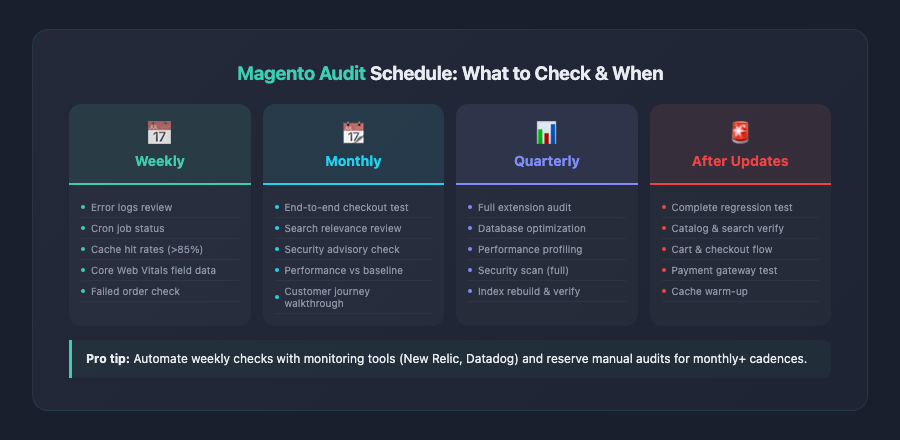
Based on the scope and complexity of Magento stores, here’s a recommended audit schedule:
- Weekly: Review error logs, cron job status, cache hit rates, and core web vitals from field data.
- Monthly: Test checkout flow end-to-end, review search relevance for top queries, check for new security advisories.
- Quarterly: Full extension audit, database optimization review, performance profiling against baseline metrics, and security scan.
- After every Magento update or major extension change: Run a complete regression test covering all critical user paths — catalog browsing, search, cart operations, checkout, and account management.
Magento vs. Other Platforms: Audit Complexity Comparison
To put the scope of a Magento audit in perspective, it’s worth comparing audit requirements across platforms:
- Shopify: Hosting, caching, and security are managed by the platform. Audits focus primarily on theme code, app selection, and conversion optimization. See our Shopify store audit guide for details.
- WooCommerce: Similar self-hosted concerns as Magento, but with a simpler architecture. Plugin conflicts, hosting quality, and WordPress core updates are the primary audit areas. Our WooCommerce store audit guide covers these specifics.
- Magento / Adobe Commerce: The most comprehensive audit requirements of any major ecommerce platform. Server infrastructure, caching layers (Varnish, Redis, FPC), complex extension ecosystem, EAV database architecture, Elasticsearch/OpenSearch, and deep customization potential all demand expert-level review.
This increased complexity is the tradeoff for Magento’s unmatched flexibility and scalability. Stores that invest in regular, thorough auditing consistently outperform those that take a reactive approach to performance and security issues.
Key Takeaways
A thorough magento store audit covers far more ground than audits on simpler platforms. Here are the essential points to remember as you work through your own audit:
- Start with infrastructure: Varnish, Redis, and full-page cache must be correctly configured before any other optimization will have meaningful impact. These aren’t advanced optimizations — they’re baseline requirements.
- Audit every extension ruthlessly: Third-party extensions are the most common source of performance degradation, security vulnerabilities, and upgrade complications. Remove what you don’t need, and scrutinize what you keep.
- Frontend performance demands deliberate effort: Magento’s default RequireJS/KnockoutJS stack is heavy. Whether you optimize your current theme or migrate to a modern alternative like Hyva, frontend performance won’t improve without intentional work.
- Database and indexer health directly affect the shopping experience: Slow queries, misconfigured indexers, and outdated flat catalog settings create performance problems that no amount of caching can fully mask.
- Elasticsearch/OpenSearch is now mission-critical infrastructure: Treat your search engine with the same care as your database. Search relevance, speed, and autocomplete quality directly drive conversions.
- Checkout optimization has outsized conversion impact: Every millisecond of latency and every unnecessary form field in your checkout flow costs you completed orders. Profile and optimize the checkout independently from the rest of your store.
- Security is non-negotiable: Apply patches promptly, enforce 2FA, scan for malware regularly, and audit admin accounts. A security breach doesn’t just cost money — it destroys customer trust permanently.
- Make auditing continuous, not one-time: Establish monitoring, set an audit cadence, and re-evaluate after every significant change. Magento stores that treat performance and security as ongoing disciplines consistently outperform those that audit reactively.
By systematically working through each section of this checklist, you’ll identify the specific issues holding your Magento store back and build a prioritized action plan that delivers measurable improvements in performance, security, and conversion rates. The investment in a proper audit pays for itself many times over — in faster page loads, higher conversion rates, and a more secure, resilient store.