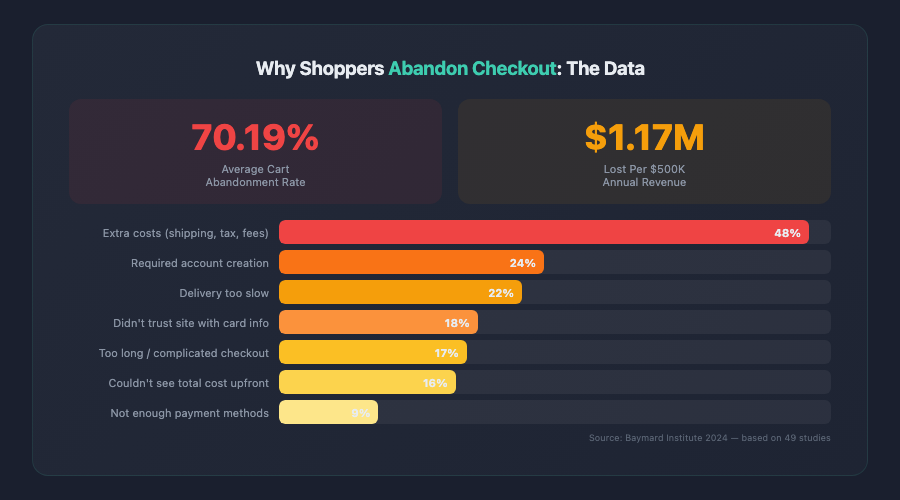
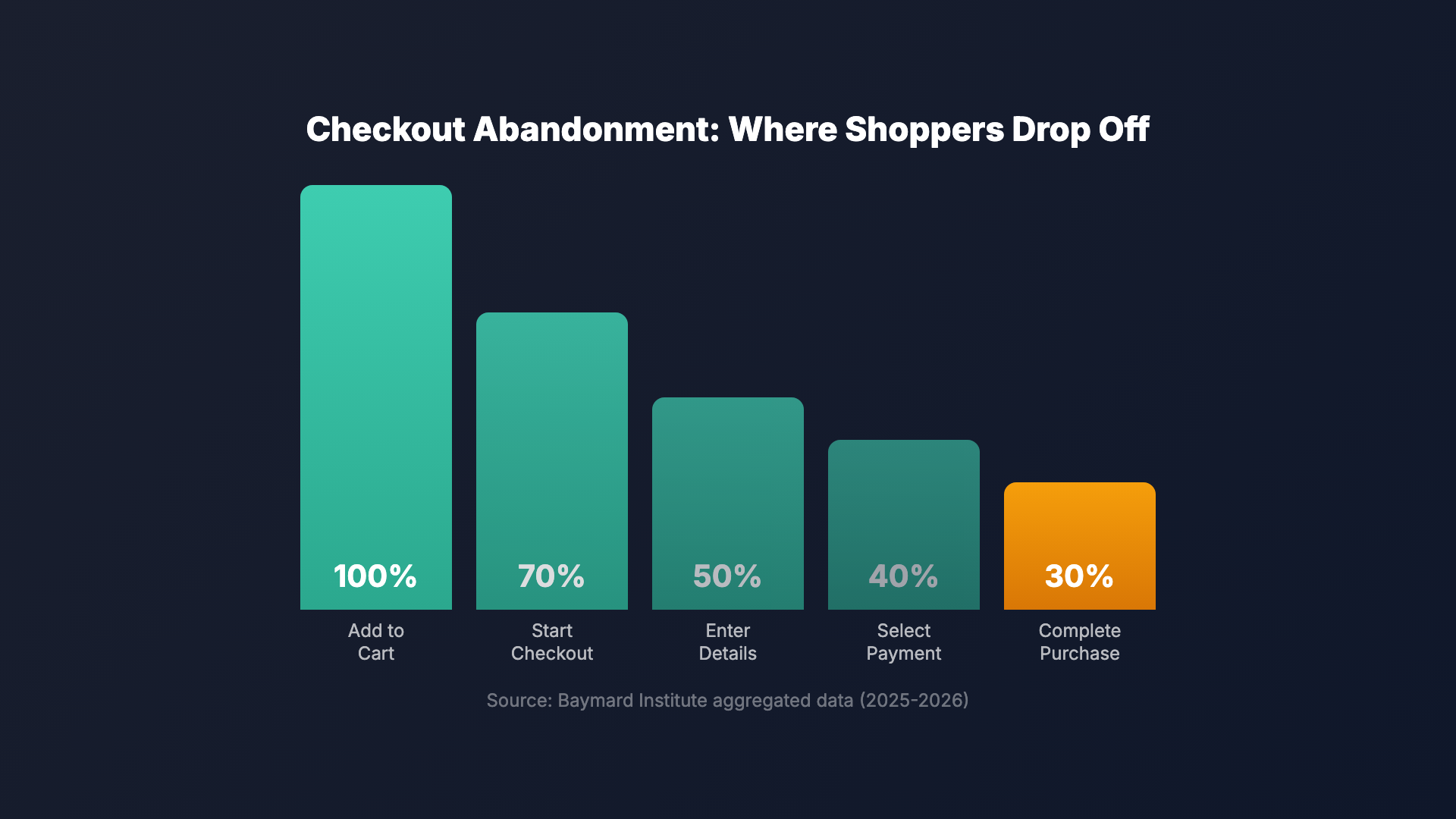
Cart abandonment is the silent killer of ecommerce revenue. According to the Baymard Institute’s aggregated research, the average cart abandonment rate sits at 70.19% — meaning roughly seven out of every ten shoppers who add items to their cart leave without completing a purchase. For a store generating $500,000 in annual revenue, that represents an estimated $1.17 million in lost sales every year.
The good news? Most abandonment stems from fixable checkout friction. Checkout optimization ecommerce strategies have matured significantly, and the data is clear: small, targeted improvements to your checkout flow can produce outsized gains in conversion rate and revenue per visitor.
This guide walks through 21 proven tactics to reduce cart abandonment — organized by category, backed by data, and ready to implement. Whether you’re running a Shopify Plus store or a custom WooCommerce build, these strategies apply.
Why Checkout Optimization Matters More Than Ever in 2026
The ecommerce landscape has shifted. Customer acquisition costs have risen sharply — Meta CPMs increased 12% year-over-year through 2025, and Google Shopping has become more competitive across nearly every vertical. When you’re paying more to bring visitors in, losing them at the final step hurts disproportionately.
| Abandonment Reason | % of Shoppers | Fix Difficulty |
|---|---|---|
| Extra costs too high (shipping, tax, fees) | 48% | Medium |
| Site wanted me to create an account | 26% | Easy |
| Delivery was too slow | 23% | Medium |
| Didn’t trust the site with credit card info | 22% | Easy |
| Too long / complicated checkout process | 18% | Medium |
| Couldn’t see total order cost up-front | 17% | Easy |
| Returns policy wasn’t satisfactory | 12% | Easy |
| Not enough payment methods | 9% | Easy |
Source: Baymard Institute, 2025-2026 aggregated data
At the same time, customer expectations have evolved. Shoppers now benchmark your checkout against the fastest, smoothest experiences they’ve encountered — Amazon’s one-click ordering, Apple Pay on mobile, Shopify’s Shop Pay. If your checkout feels clunky by comparison, they’ll leave.
Consider these statistics:
- 22% of shoppers abandon checkout because the process is too long or complicated (Baymard Institute, 2025)
- 13% leave because the site crashed or had errors
- 9% abandon because there weren’t enough payment methods
- Mobile cart abandonment rates average 76% — roughly 8 percentage points higher than desktop
Each of these is a design and engineering problem with a known solution. Checkout optimization for ecommerce isn’t about guessing — it’s about systematically eliminating the friction points that data has already identified. If you haven’t conducted a thorough review of your conversion funnel recently, start with our ecommerce CRO audit guide to identify where the biggest leaks are.
Streamline Your Checkout Flow: Reduce Steps and Friction
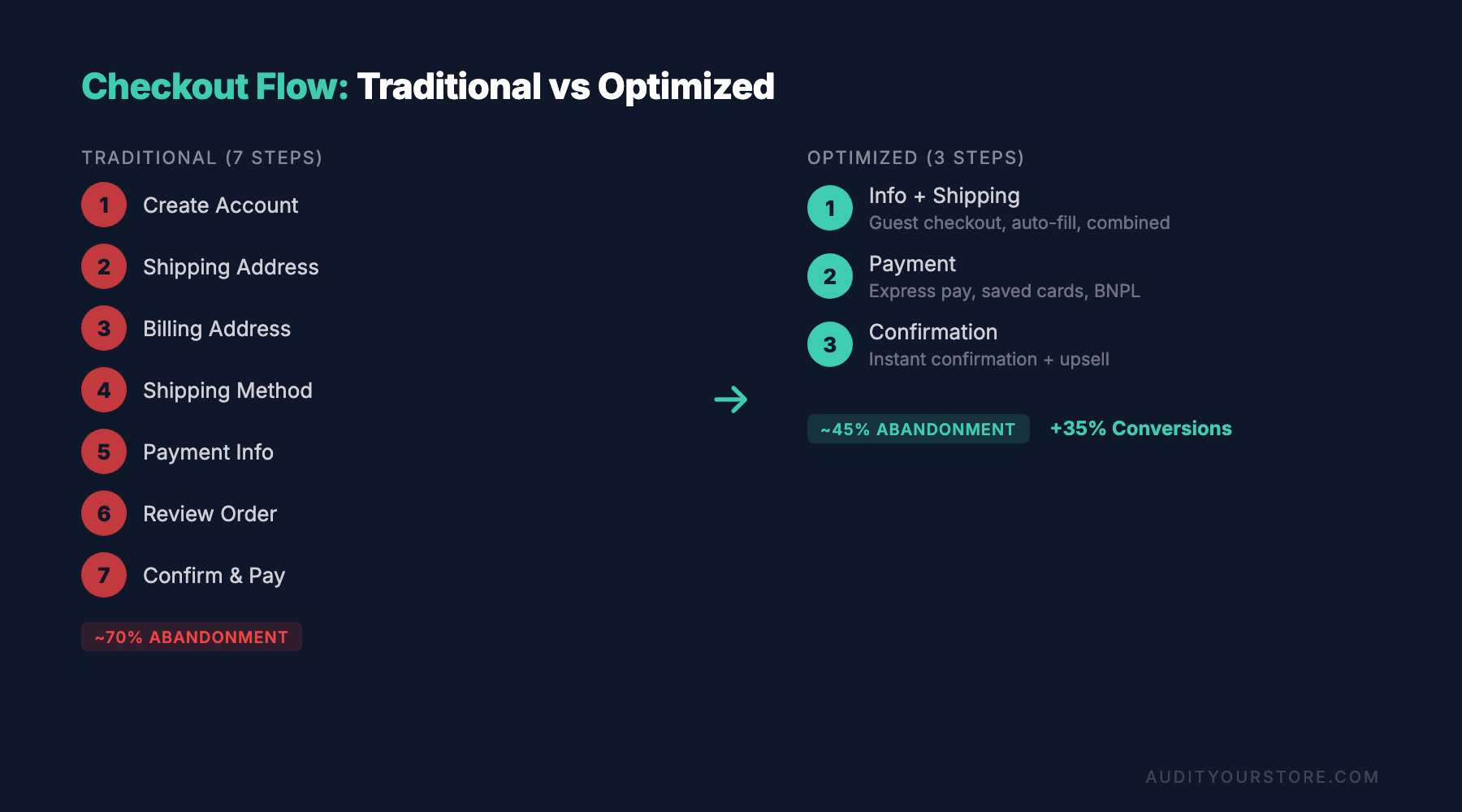
The most impactful checkout optimization ecommerce teams can make is often the simplest: remove unnecessary steps. Every additional page, field, or decision point in your checkout is an opportunity for the shopper to reconsider, get distracted, or give up.
Tactic 1: Implement a Single-Page Checkout
Multi-step checkouts aren’t inherently bad — Baymard’s research shows that well-designed multi-step flows can convert on par with single-page designs. But poorly executed multi-step checkouts (which is most of them) create friction. If your current flow spans three or more pages, consolidating to a single page or a streamlined two-step process almost always improves conversion.
Example: When Shopify rolled out its redesigned one-page checkout in 2023, merchants who adopted it reported conversion rate increases of 4-6% on average. The key wasn’t just fewer pages — it was reduced perceived complexity.
Tactic 2: Cut Unnecessary Form Fields
Audit every field in your checkout. Does your store actually need a phone number for non-SMS customers? Do you need a separate billing address by default, or can you default to “same as shipping” and let customers opt out? The Baymard Institute found that the average checkout contains 11.3 form fields, while the optimal number is closer to 6-8.
Fields to consider removing or making optional:
- Company name (unless you sell B2B)
- Address line 2 (make it a collapsible “Add apartment, suite, etc.” link)
- Phone number (unless required for shipping carrier)
- Separate billing address (default to shipping address)
Tactic 3: Use Smart Defaults and Auto-Fill
Leverage browser autofill by using standard HTML autocomplete attributes on your form fields. This alone can cut checkout time by 30% or more on desktop. On mobile, it’s even more impactful — nobody wants to type a full address on a phone keyboard.
Also implement address auto-completion via Google Places API or a similar service. When a customer starts typing their street address, predictive suggestions reduce keystrokes and eliminate typos that cause failed deliveries.
Tactic 4: Enable Guest Checkout (and Make It the Default)
Forced account creation is the second most common reason shoppers cite for abandoning checkout. Yet many stores still gate the purchase behind a registration wall. The fix is straightforward: let customers check out as guests, and offer account creation after the purchase is complete — on the thank-you page, when there’s zero friction left.
ASOS does this well. Guest checkout is the default path. After purchase, they prompt: “Want to save your details for next time? Create a password.” The conversion from guest to registered customer is surprisingly high because the customer has already committed.
Optimize Checkout for Mobile Shoppers
Mobile commerce now accounts for over 60% of ecommerce traffic and roughly 54% of sales in most verticals. Yet mobile checkout experiences consistently lag behind desktop in conversion rate. This gap represents one of the largest opportunities in ecommerce checkout optimization.
Tactic 5: Design for Thumb Zones
Primary action buttons — “Continue to shipping,” “Place order” — should sit in the natural thumb reach zone on mobile devices. That means bottom-center of the screen, with a minimum tap target of 48×48 pixels (Google’s recommendation). Too many checkouts place critical buttons in hard-to-reach positions, creating unnecessary fumbling.
Tactic 6: Use Numeric Keypads for Number Fields
Set inputmode="numeric" on credit card, CVV, zip code, and phone number fields. This triggers the numeric keyboard on mobile devices instead of the full QWERTY layout, which reduces errors and speeds up entry. It’s a small detail, but these small details compound.
Tactic 7: Implement Digital Wallets as Primary Payment Options
Apple Pay, Google Pay, and Shop Pay can reduce mobile checkout time from minutes to seconds. When a customer taps Apple Pay, their shipping address, email, and payment information are pre-filled from their device — they’re authenticated via Face ID or fingerprint and done.
The data is compelling: Shop Pay reports a checkout-to-conversion rate of 91% for returning users, compared to the typical 47-49% for standard checkout flows. If you’re on Shopify and haven’t enabled Shop Pay, you’re leaving significant revenue on the table.
“The best mobile checkout is the one the customer barely notices. If they have to think about the process, you’ve already introduced friction.” — Checkout UX research, Baymard Institute
Tactic 8: Collapse Optional Sections by Default
Promo code fields, order notes, gift wrapping options — these should be collapsed behind a text link, not displayed as open form fields. An open promo code field on mobile is particularly damaging: it reminds customers who don’t have a code that they might be missing a discount, which sends them off to Google for coupon codes (and 40% of them never come back).
Build Trust and Eliminate Anxiety at Checkout
Trust is the invisible factor behind many abandoned carts. Even if a customer likes your product and accepts the price, a nagging feeling that the transaction isn’t safe or the store isn’t legitimate will stop them. Effective ecommerce checkout optimization addresses this psychological barrier head-on.
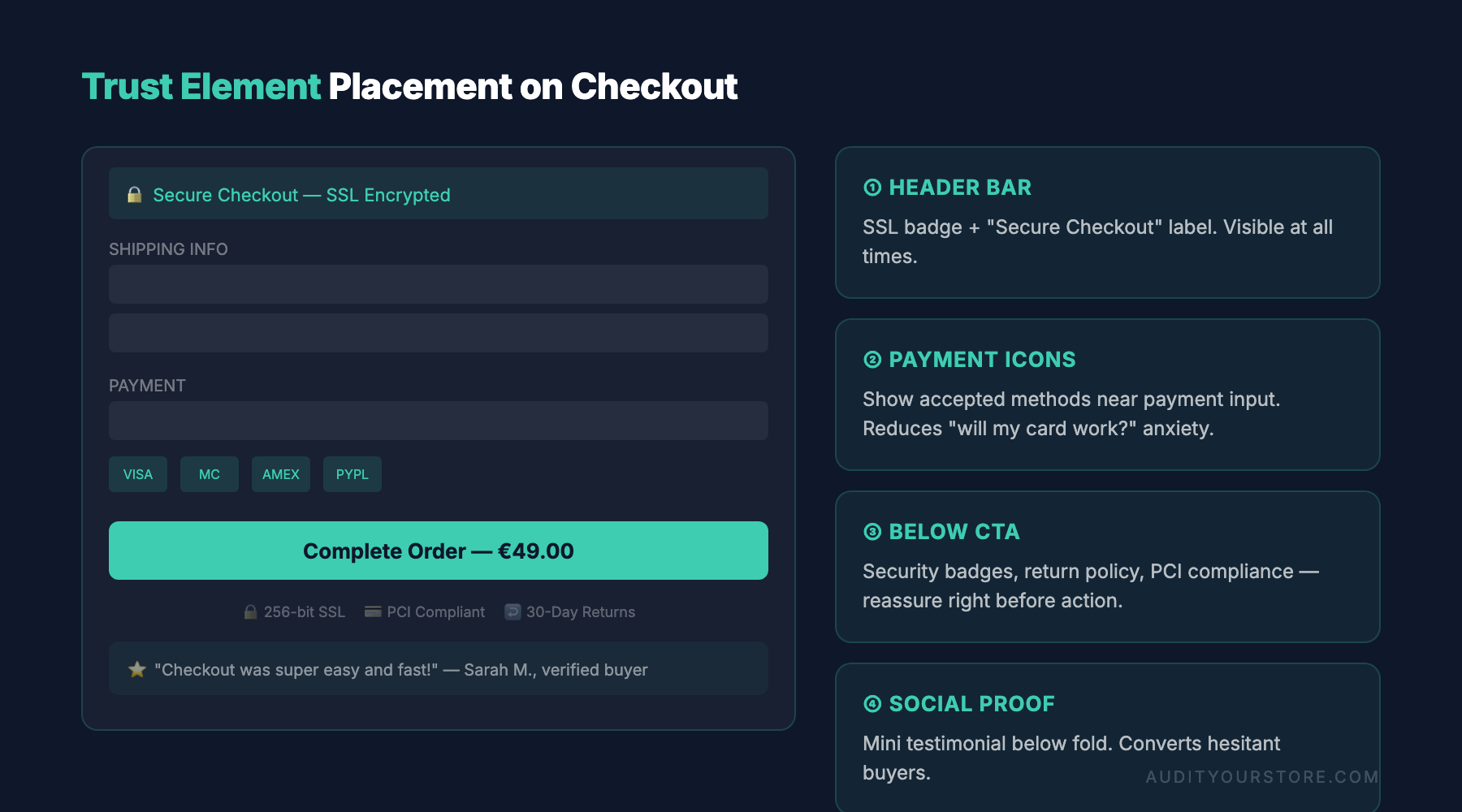
Tactic 9: Display Security Badges Near the Payment Form
Place recognizable trust signals — SSL padlock, payment provider logos (Visa, Mastercard, PayPal), and security badges — adjacent to the credit card entry fields. Baymard’s testing found that trust seals placed near the payment form had a measurable positive effect on perceived security, while those placed in the header or footer had almost no impact.
Don’t overdo it, though. A wall of fifteen badges looks spammy. Stick to 3-5 recognizable signals.
Tactic 10: Show a Clear Return and Refund Policy Summary
Include a brief, one-line return policy near your “Place order” button — for example: “Free returns within 30 days. No questions asked.” This reduces purchase anxiety at the critical moment. Zappos famously built its brand on a 365-day return policy, and they credit it as a major contributor to their high checkout conversion rate.
Tactic 11: Use Real-Time Form Validation
Nothing destroys trust faster than submitting a checkout form and getting an error page. Implement inline validation that checks fields as the customer fills them out — marking valid fields with a green check and flagging errors immediately with specific, helpful messages. Instead of “Invalid input,” say “Please enter a 5-digit zip code.”
Tactic 12: Show an Order Summary Throughout Checkout
Keep a persistent, visible order summary (product thumbnails, quantities, prices) present throughout the checkout flow. Customers who can see exactly what they’re buying and what they’re paying feel more in control. On mobile, use a collapsible order summary at the top of the screen that the customer can expand at any point.
Pricing, Shipping, and Payment: Remove the Financial Surprises
The number one reason for cart abandonment — cited by 48% of shoppers — is unexpected costs at checkout. Shipping fees, taxes, and handling charges that appear late in the process feel deceptive, even when they’re standard. Optimizing how you present costs is a cornerstone of any ecommerce checkout optimization strategy.
Tactic 13: Show Total Cost as Early as Possible
Ideally, the customer should know the total estimated cost — including shipping and tax — before they even enter the checkout. Display estimated shipping on the product page or in the cart. If exact shipping depends on location, use IP-based geolocation to provide an estimate and clearly label it as estimated.
Example: Allbirds shows “Free shipping and returns” directly on the product page, eliminating the most common source of checkout sticker shock entirely. Brands that can’t offer free shipping should still show estimated costs early — a $7.99 shipping fee is much less painful when you see it before you start entering your address.
Tactic 14: Offer Multiple Shipping Options (Including a Free Tier)
Give customers choices. A common structure that works well:
- Free standard shipping (5-7 business days) — even if you need a minimum order threshold
- Expedited shipping ($8-12, 2-3 business days)
- Express/overnight ($15-25, 1 business day)
When a free option is available, customers who choose to pay for faster shipping do so willingly — it’s a positive choice, not a forced cost. This framing significantly reduces abandonment.
Tactic 15: Offer Buy Now, Pay Later (BNPL)
Services like Klarna, Afterpay, and Affirm have gone from novelty to expectation, especially for orders over $75. Offering BNPL options can increase average order value by 20-30% and improve checkout conversion, particularly among younger demographics. Display the installment amount on the product page (e.g., “or 4 interest-free payments of $24.75”) so the customer enters checkout already expecting the option.
Tactic 16: Provide at Least 3-4 Payment Methods
At minimum, your checkout should accept:
- Major credit/debit cards (Visa, Mastercard, Amex)
- PayPal (still a significant trust driver for many customers)
- Apple Pay and/or Google Pay
- At least one BNPL option
For international stores, consider regional payment methods: iDEAL in the Netherlands, Bancontact in Belgium, PIX in Brazil. Localized payment options can increase conversion by 10-15% in those markets.
Post-Abandonment Recovery: Win Back Lost Checkouts
Even with a perfectly optimized checkout, some abandonment is inevitable — the customer’s boss walks in, their phone dies, they need to check with a partner. What separates high-performing stores from average ones is how effectively they recover these lost sales.
Tactic 17: Implement a 3-Email Abandonment Sequence
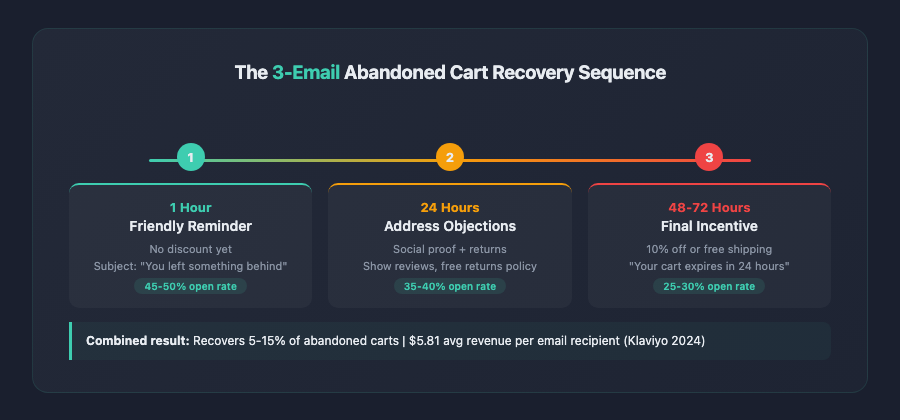
Cart abandonment emails remain one of the highest-ROI tactics in ecommerce. A proven three-email sequence:
- Email 1 (1 hour after abandonment): Friendly reminder with product images. No discount. Subject line: “You left something behind.” Average open rate: 45-50%.
- Email 2 (24 hours later): Address potential objections — highlight return policy, reviews, or social proof. Still no discount.
- Email 3 (48-72 hours later): If margins allow, introduce a small incentive — 10% off or free shipping. Create mild urgency: “Your cart is reserved for 24 more hours.”
This sequence typically recovers 5-15% of abandoned carts, with the first email driving the majority of recoveries. Klaviyo’s benchmark data shows abandoned cart emails generate an average of $5.81 per recipient.
Tactic 18: Use SMS Recovery for Opted-In Customers
SMS abandonment messages have even higher engagement rates than email — open rates above 90% and click-through rates of 15-20%. Send a single, concise SMS 30-60 minutes after abandonment: “Hey [Name], you left items in your cart at [Store]. Complete your order here: [link].” Keep it to one message to avoid being intrusive.
Tactic 19: Deploy Exit-Intent Offers Strategically
Exit-intent popups on the checkout page can intercept abandoning visitors with a relevant offer. But be strategic — showing a discount to every leaving customer trains shoppers to abandon on purpose. Better approaches include:
- Offering free shipping instead of a percentage discount (higher perceived value, lower margin impact)
- Only triggering the popup for first-time visitors (use a cookie to suppress it for returning customers)
- Showing social proof instead of a discount: “2,847 customers bought this item this month”
Advanced Ecommerce Checkout Optimization Techniques
Once you’ve implemented the foundational tactics above, these advanced strategies can drive incremental gains that compound over time. This is where checkout optimization ecommerce work shifts from fixing problems to fine-tuning performance.
Tactic 20: A/B Test Checkout Layout and Copy Systematically
Don’t assume — test. Elements worth testing include:
- CTA button text: “Place order” vs. “Complete purchase” vs. “Pay now” (surprisingly, this can move conversion by 1-3%)
- Progress indicators: Step numbers vs. progress bar vs. no indicator at all
- Social proof placement: Review count near products in the order summary vs. trust badges near payment
- Button color: High-contrast buttons that stand out from the rest of the page consistently outperform low-contrast alternatives
- Field order: Testing email-first vs. name-first — collecting the email first ensures you can send abandonment emails even if the customer drops off during address entry
Run tests for a minimum of two full business cycles (typically 2-4 weeks) and aim for 95% statistical significance before declaring a winner. Tools like Google Optimize’s sunset has pushed many teams to VWO, AB Tasty, or Optimizely for robust checkout testing.
Tactic 21: Implement Checkout Extensibility and Personalization
The future of checkout optimization is dynamic, personalized checkout experiences. Shopify’s Checkout Extensibility platform, BigCommerce’s Checkout SDK, and similar tools now allow you to:
- Show different upsell offers based on cart contents (e.g., a phone case customer sees a screen protector offer)
- Display loyalty points balance for returning customers
- Customize delivery date messaging by product type
- Surface relevant trust signals based on customer segment (first-time vs. returning)
Brands like Gymshark and Heinz Direct have used checkout customization to increase average order value by 8-12% without negatively impacting conversion rate — the key is ensuring upsells don’t add steps or complexity to the core flow.
If you’re running on Shopify, our Shopify store audit guide covers how to evaluate your checkout configuration alongside the rest of your store setup.
How to Prioritize Your Checkout Optimization Roadmap
Twenty-one tactics is a lot. You can’t (and shouldn’t) implement them all simultaneously. Here’s a practical framework for prioritization:
Start with Analytics
Before changing anything, instrument your checkout funnel. In Google Analytics 4, set up a funnel exploration from cart to purchase, broken down by device type. Identify your biggest drop-off point — that’s where you focus first.
Key metrics to track:
- Cart-to-checkout rate: What percentage of shoppers with items in their cart actually initiate checkout?
- Checkout completion rate: Of those who start checkout, what percentage finish?
- Step-level drop-off: If you have a multi-step checkout, which step loses the most people?
- Payment failure rate: How often do payment attempts fail? (This is an often-overlooked technical issue.)
Apply the ICE Framework
Score each potential optimization on three dimensions:
- Impact: How much revenue could this drive? (High/Medium/Low)
- Confidence: How sure are you it will work, based on data and best practices? (High/Medium/Low)
- Ease: How quickly and cheaply can you implement it? (High/Medium/Low)
Typically, the highest-ICE checkout optimizations are: enabling guest checkout, adding digital wallets, showing costs earlier, and implementing abandonment emails. These are well-proven, relatively easy to implement, and high-impact.
Build a Testing Calendar
Plan to test one checkout change at a time (unless you have enough traffic for multivariate testing). A reasonable cadence is one test every 2-3 weeks. Over a quarter, that’s 4-6 validated improvements — each potentially worth a 1-5% lift in conversion rate.
For a more structured approach, our product page best practices guide covers the upstream optimizations that feed into checkout performance — because the best checkout in the world can’t fix poor product page persuasion.
If you want a systematic framework for auditing every element of your store’s conversion funnel — not just checkout — our 276-point CRO checklist covers each stage from landing page through post-purchase, helping you identify exactly where the highest-leverage improvements are hiding.
Key Takeaways: Your Checkout Optimization Action Plan
Checkout optimization for ecommerce is not a one-time project — it’s an ongoing discipline. But the tactics in this guide give you a clear starting point. Here’s what to remember:
- Cart abandonment averaging 70% is the norm, not the exception. But every percentage point you recover translates directly to revenue. A store doing $1M/year that reduces abandonment by 5 points can expect roughly $175,000 in recovered annual revenue.
- Eliminate surprise costs. Show shipping, taxes, and total cost as early as possible — ideally before the customer enters checkout. Unexpected fees are the top abandonment driver.
- Reduce form fields and steps. Target 6-8 fields maximum. Enable guest checkout by default. Use autofill and address autocomplete to speed things up.
- Prioritize mobile. With the majority of traffic coming from phones, thumb-friendly design, numeric keypads, and digital wallet integration are non-negotiable.
- Build trust at the point of payment. Security badges near the card fields, clear return policies, and real-time form validation all reduce anxiety at the critical moment.
- Offer multiple payment methods. Credit cards, PayPal, Apple Pay/Google Pay, and at least one BNPL option. Every missing method is a segment of customers you’re excluding.
- Recover abandoned carts systematically. A 3-email sequence starting one hour after abandonment is table stakes. Add SMS for opted-in customers for even higher recovery rates.
- Test everything. Don’t implement changes blindly — A/B test CTA copy, layout, field order, and trust signal placement. Let data guide your decisions.
- Use the ICE framework to prioritize. Start with high-impact, high-confidence, easy-to-implement changes: guest checkout, digital wallets, transparent pricing, and abandonment emails.
- Treat checkout optimization as ongoing. Customer expectations evolve, platforms release new features, and your product mix changes. Revisit your checkout quarterly and keep testing.
The gap between an average checkout and a great one is rarely a single dramatic change. It’s the accumulation of dozens of small, tested improvements — each removing a bit of friction, building a bit more trust, and making it a little easier for your customer to say yes. Start with the tactic that addresses your biggest drop-off point, measure the result, and keep going.