
Your ecommerce homepage is the digital storefront that shapes every first impression. Research from the Baymard Institute shows that users form a judgment about a website within 50 milliseconds of landing on it, and that snap decision determines whether they explore further or bounce. Ecommerce homepage optimization is no longer a nice-to-have — it is the single most impactful conversion lever you can pull in 2026.
Unlike product pages or checkout flows, the homepage serves multiple audiences simultaneously: first-time visitors who need orientation, returning customers who want efficiency, bargain hunters scanning for deals, and high-intent shoppers ready to buy. Balancing these competing needs above the fold — the viewport users see before scrolling — is both an art and a science.
In this guide, we break down every element of a high-converting ecommerce homepage, drawing on real-world examples, current data, and battle-tested CRO principles. Whether you are running a Shopify store, a headless commerce build, or a custom platform, these best practices apply universally.
Why Above-the-Fold Hierarchy Defines Ecommerce Homepage Performance
The term “above the fold” originates from newspaper publishing, where the most compelling headline had to appear on the top half of the front page. In digital commerce, the principle is identical: the content visible before any scrolling must communicate who you are, what you sell, and why a visitor should care.
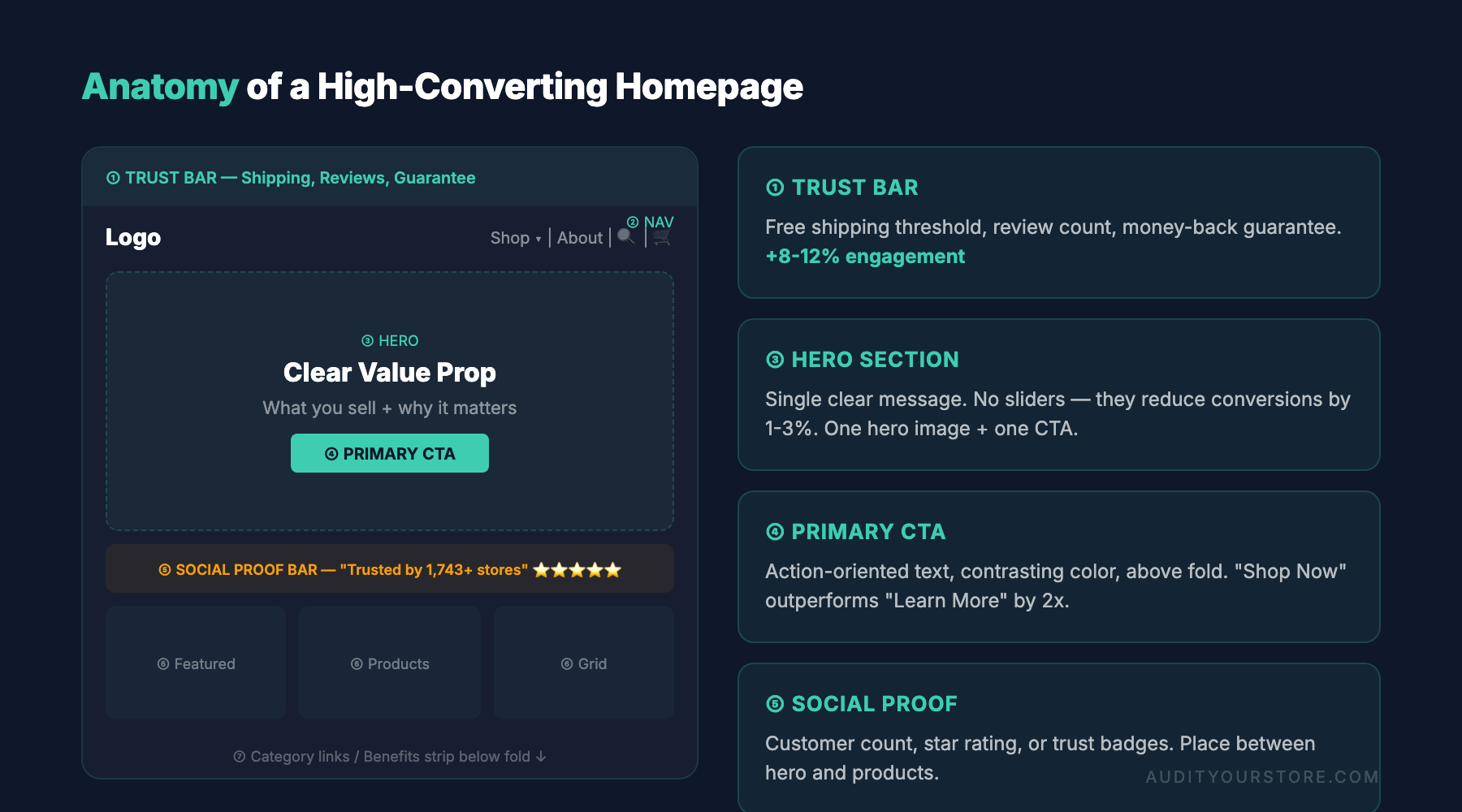
| Homepage Element | Conversion Impact | Priority |
|---|---|---|
| Clear value proposition | +30-50% engagement | 🔴 Critical |
| Single hero CTA (vs. carousel) | +20-30% clicks | 🔴 Critical |
| Social proof bar | +15-25% trust | 🟡 High |
| Category navigation grid | +10-20% discovery | 🟡 High |
| Site search (visible) | +15-30% for searchers | 🟡 High |
| Personalized content | +10-15% engagement | 🟢 Medium |
| Seasonal merchandising | +5-15% relevance | 🟢 Medium |
A 2025 Nielsen Norman Group eye-tracking study confirmed that 57% of page-viewing time is spent above the fold, with an exponential drop-off as users scroll. For ecommerce, this means your hero area, primary navigation, value proposition, and trust signals must all coexist in a tightly orchestrated visual hierarchy.
The three-second test
Ask someone unfamiliar with your brand to look at your homepage for three seconds, then describe what the site sells and who it is for. If they cannot answer both questions, your above-the-fold hierarchy has failed. This simple exercise often reveals problems that analytics alone will miss:
- A hero image that is visually striking but contextually vague
- A headline that prioritizes cleverness over clarity
- Navigation labels that use internal jargon instead of customer language
- A call-to-action button that blends into the background
Brands like Allbirds pass this test consistently. Their homepage immediately communicates “sustainable footwear” through a clean hero with a product-focused image, a short headline, and a prominent “Shop” CTA. There is zero ambiguity about what the company does or what the visitor should do next.
Visual hierarchy principles for ecommerce
Effective above-the-fold design follows a predictable eye-flow pattern. On desktop, the dominant pattern is the F-shape or Z-shape scan. On mobile — which now accounts for over 72% of ecommerce traffic globally — users scan in a linear, top-to-bottom sequence. Your homepage hierarchy should account for both:
- Logo and trust anchor (top-left on desktop, centered on mobile)
- Primary navigation (horizontal bar on desktop, hamburger menu on mobile)
- Utility bar (search, account, cart — top-right on desktop)
- Hero section (dominant visual with headline and CTA)
- Secondary trust signals (free shipping bar, ratings badge, payment icons)
Each layer must have clear visual separation. When elements compete for attention at the same hierarchy level, conversion rates suffer. If you want a structured way to evaluate these layers on your own site, our full CRO audit guide walks through every checkpoint.
Hero Section Optimization: The Engine of Homepage Conversions
The hero section is the most valuable piece of real estate on your entire website. It occupies the largest visual footprint above the fold and bears the heaviest burden: converting attention into action within seconds. Getting hero section optimization right can lift homepage click-through rates by 20–40% based on case studies from VWO and Convert.
Static hero vs. carousel: the data is clear
Despite their popularity, auto-rotating carousels consistently underperform static heroes. Research from the University of Notre Dame found that only 1% of users clicked on a carousel, and 89% of those clicks were on the first slide. Carousels create “banner blindness,” dilute the primary message, and introduce accessibility issues for screen reader users.
If you must feature multiple promotions, consider a static hero with a secondary content row below it, or use a manually navigable slider (no auto-rotation) with clear slide indicators. But the highest-performing approach in 2026 remains a single, focused hero with one message and one call to action.
Anatomy of a high-converting hero
The best ecommerce hero sections share these components:
- A product-in-context image or short video: Show the product being used or worn, not floating in a void. Gymshark excels at this by featuring athletes mid-workout wearing their latest collection, which simultaneously communicates product quality and brand identity.
- A benefit-driven headline: Lead with the outcome the customer wants, not the feature you built. “Engineered for your best run” outperforms “New lightweight running shoe” every time.
- A concise supporting line: One sentence that adds specificity. Mention a material, a price point, or a limited-time offer.
- A high-contrast CTA button: Use action-oriented text (“Shop the Collection,” “Explore New Arrivals”) and ensure the button color contrasts sharply with the background. Avoid generic labels like “Learn More.”
Mobile hero considerations
On mobile, the hero image is often cropped unpredictably. Design your hero with a “safe zone” — keep the focal point of the image and all text in the center 60% of the frame. Ensure that text overlaid on the image remains legible across screen sizes by using a semi-transparent overlay or placing text outside the image entirely. Glossier handles this well by using soft, pastel background colors with product imagery that scales gracefully, and headline text that sits above or below the image rather than on top of it.
Crafting a Value Proposition That Stops the Scroll
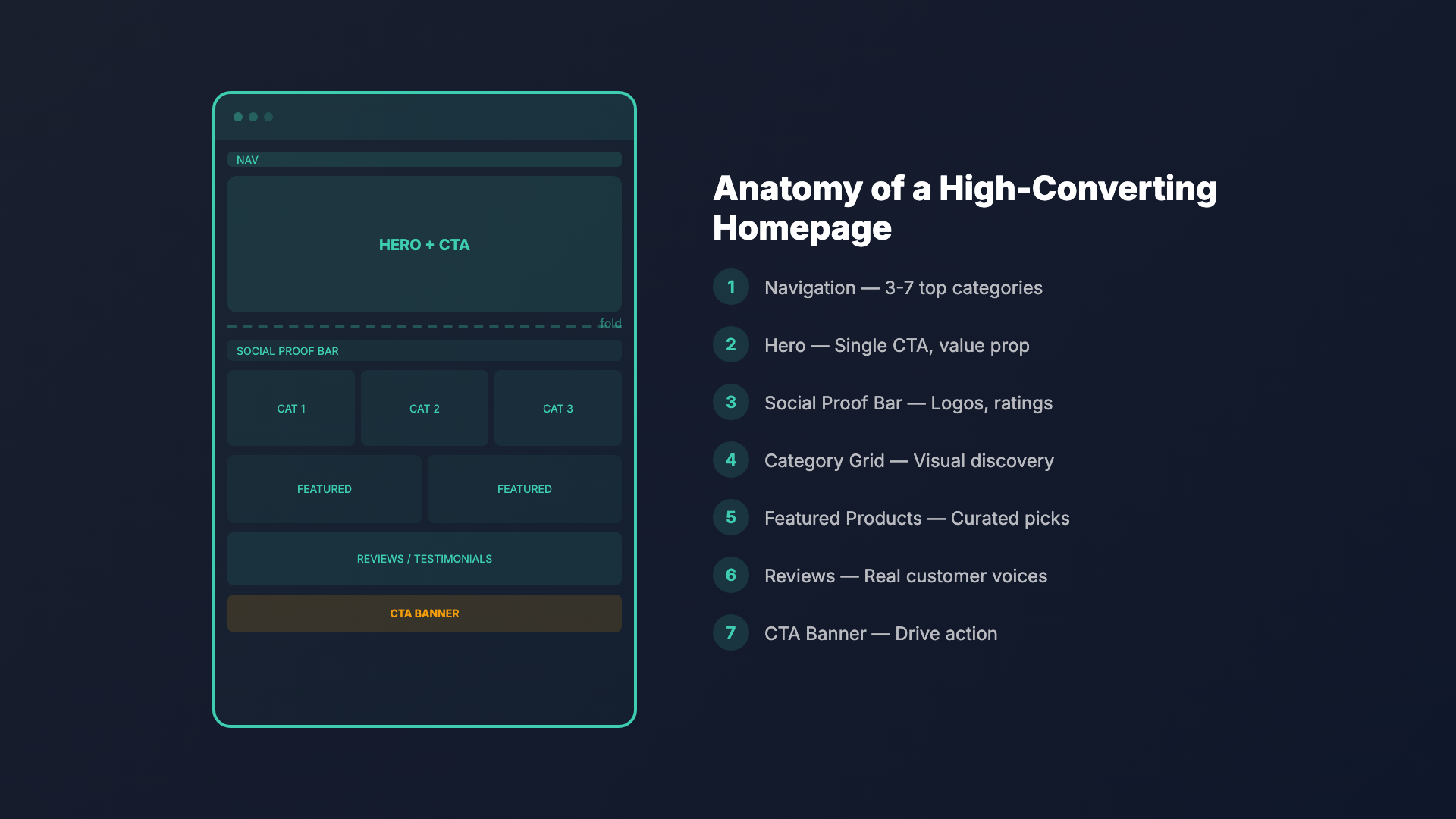
Your value proposition is the reason a customer should buy from you instead of from Amazon, a competitor, or a physical store. It must be visible — ideally above the fold — and it must be specific. Vague promises like “the best quality” or “great customer service” are invisible to modern shoppers who have heard it all before.
The value proposition formula
An effective ecommerce value proposition answers three questions in a single glance:
- What do you sell? (Product category clarity)
- What makes you different? (Differentiation)
- Why should I trust you? (Proof)
Warby Parker nails this: their homepage communicates “prescription eyewear, starting at $95, with free home try-on and free shipping.” In one encounter, the visitor understands the product, the price advantage, and the risk-free purchasing model.
Where to place your value proposition
Many stores bury their differentiators on an “About Us” page that fewer than 5% of visitors ever see. Instead, surface your value proposition through multiple touchpoints on the homepage:
- Announcement bar: A thin, persistent bar at the top of the page (“Free shipping on orders over $50 | 30-day hassle-free returns”)
- Hero headline: Weave your core differentiator into the primary message
- Icon row: A horizontal strip of 3–4 icons with short labels (free shipping, easy returns, sustainable materials, 24/7 support) placed just below the hero
- Social proof bar: “Trusted by 100,000+ customers” or “Rated 4.8/5 on Trustpilot”
Repeating your value proposition in different formats is not redundant — it is reinforcement. Different visitors are persuaded by different proof points, and not everyone reads the same section.
Navigation UX and Search: Guiding Visitors to the Right Products
Homepage optimization for ecommerce stores often focuses on visual elements while neglecting navigation, which is arguably more important. A beautiful homepage that fails to get visitors to the right product in two clicks or fewer is a beautiful failure.
Primary navigation best practices
Your main navigation should reflect how customers think, not how your warehouse is organized. Follow these principles:
- Limit top-level items to 5–7: Cognitive load research (Miller’s Law) shows that people struggle to process more than seven items simultaneously. If you have a large catalog, use mega menus with clear category groupings.
- Use descriptive labels: “Women’s Running Shoes” is better than “Running” or “Women’s.” The more specific the label, the more confidently visitors will click.
- Prioritize by revenue and demand: Place your highest-traffic and highest-revenue categories first (left-to-right on desktop). Use analytics data to determine the order, not internal opinions.
- Include a “Sale” or “New Arrivals” link: These are among the most-clicked navigation items across all ecommerce verticals. Give them visual distinction with a colored badge or different font weight.
ASOS provides a benchmark for navigation UX. Their mega menu is organized by gender, then by product type, with curated editorial picks (“Trending Now,” “Festival Season”) woven in. The menu loads instantly, includes thumbnail images for key categories, and offers a persistent search bar at the top.
Search functionality as a conversion driver
Site search is a massively underutilized conversion tool. Visitors who use search convert at 2–3x the rate of those who browse, yet many ecommerce stores treat search as an afterthought with a tiny magnifying glass icon tucked in a corner.
In 2026, homepage search optimization means:
- Prominent placement: A visible search bar (not just an icon) above the fold on both desktop and mobile. Amazon devotes an enormous portion of their header to search for good reason — it is the primary way most customers navigate.
- Autocomplete with product previews: As users type, show product thumbnails, prices, and ratings in the dropdown. This reduces friction by letting shoppers evaluate products before even reaching a results page.
- Typo tolerance and synonym matching: If someone searches “grey hoodie” and your catalog says “gray hoodie,” the search must still return results. AI-powered search tools like Algolia, Searchspring, and Klevu handle this natively.
- Zero-results page strategy: Never show a dead end. If a search returns no results, display popular products, trending categories, or a curated recommendation block.
Consider running a Shopify store audit if you are on that platform — search configuration is one of the most commonly misconfigured elements in Shopify themes.
Category Showcasing and Product Discovery on the Homepage
Below the hero, the homepage must transition smoothly from inspiration to navigation. This is where category showcasing becomes critical. The goal is to help visitors self-segment and find their path to purchase with minimal effort.
Category grid design
A well-designed category section typically features 4–8 product categories displayed as clickable cards with lifestyle images and clear labels. This section serves as a visual table of contents for your store. Key design guidelines include:
- Consistent image treatment: All category images should have the same aspect ratio, color temperature, and styling. Inconsistency creates visual noise and reduces trust.
- Lifestyle over product shots: Category thumbnails should show the product in context. A “Kitchen” category performs better with an image of a styled kitchen than a grid of pots and pans.
- Overlay text with sufficient contrast: If labels sit on top of images, use a text shadow, gradient overlay, or solid background strip to ensure readability at every screen size.
CB2 (Crate & Barrel’s modern line) handles category showcasing with a curated editorial approach. Their homepage features a mix of room-scene photography and individual product highlights, creating a magazine-like browsing experience that encourages exploration.
Featured products and curated collections
Beyond categories, the homepage should feature a selection of specific products. The most effective approaches include:
- Bestsellers: A “Most Popular” or “Customer Favorites” row provides social proof while showcasing proven products.
- New arrivals: Returning customers, who may represent 40–60% of your traffic, need a reason to re-engage. A “Just Dropped” section signals freshness.
- Staff picks or editorial curation: Nordstrom uses editorial-style “Our Stylists Love” sections that blend content marketing with product merchandising, adding a human touch that pure algorithms cannot replicate.
- Price-anchored collections: “Under $50” or “Gifts Under $25” collections reduce decision fatigue by pre-filtering based on budget, which is one of the most common purchase barriers.
Each product card in these sections should include the product image, name, price (with sale price if applicable), star rating, and a quick-add or quick-view button. The fewer clicks between discovery and cart, the higher your conversion rate.
Social Proof Placement: Building Trust on Your Ecommerce Homepage
Trust is the currency of ecommerce. Unlike physical retail, online shoppers cannot touch the product, look the salesperson in the eye, or walk past a fitting room. Social proof fills that trust gap, and its placement on the homepage directly impacts conversion. Optimizing social proof is a key part of ecommerce homepage optimization that many stores neglect.
Types of social proof and where they belong
Not all social proof is created equal. Here is a hierarchy, ordered by persuasive impact for ecommerce:
- Customer reviews and ratings: The most powerful form. Display aggregate ratings (“Rated 4.8/5 from 12,000+ reviews”) in your hero area or announcement bar. Feature individual testimonials with customer photos further down the page.
- User-generated content (UGC): An Instagram-style gallery of real customers using your products. Fenty Beauty integrates a UGC feed directly into their homepage, showing diverse customers wearing their products. This simultaneously provides social proof and demonstrates product range.
- Press mentions and “As Seen In” logos: If your brand has been featured in recognized publications, a logo bar (Vogue, GQ, The New York Times, Wired) adds instant credibility. Place this below the hero or above the footer.
- Trust badges and certifications: SSL badges, payment provider logos (Visa, Mastercard, PayPal, Apple Pay), and industry certifications (B Corp, organic, cruelty-free) belong near any point of transaction consideration.
- Real-time activity notifications: “Sarah from Austin just purchased…” pop-ups can increase urgency, but use them sparingly and honestly. Fake notifications erode trust faster than having no social proof at all.
The credibility stack
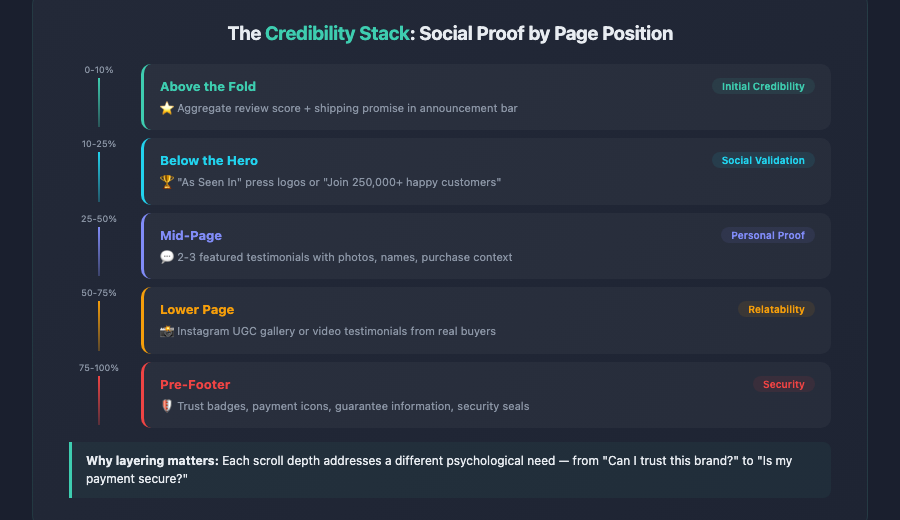
The most effective homepage social proof strategy layers multiple types together in what we call a “credibility stack.” Here is how to structure it:
Above the fold: Aggregate review score + shipping/returns promise in the announcement bar.
Below the hero: “As Seen In” press logo bar or a one-line customer count (“Join 250,000+ happy customers”).
Mid-page: 2–3 featured customer testimonials with photos, names, and purchase context.
Lower page: Instagram UGC gallery or video testimonials.
Pre-footer: Trust badges, payment icons, and guarantee information.
This layered approach ensures that no matter where a visitor is on the page, a trust signal is within view. For a deeper dive into how trust elements impact product-level conversions, see our guide on product page optimization.
Homepage Personalization and Dynamic Content Strategies
Generic homepages are leaving money on the table. In 2026, the gap between personalized and non-personalized ecommerce experiences is widening dramatically. McKinsey reports that personalization can lift revenue by 10–15%, and homepage personalization is one of the highest-impact places to start.
Personalization tiers for ecommerce homepages
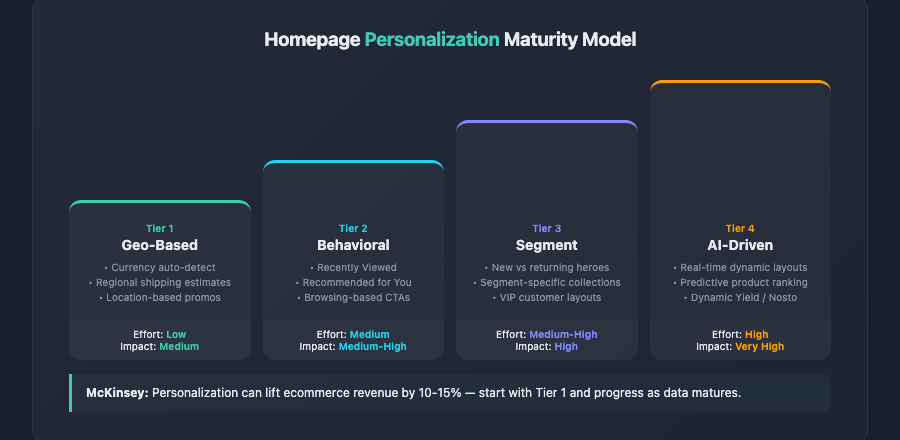
Not every store needs a Netflix-grade recommendation engine. Personalization exists on a spectrum, and even basic implementations drive measurable results:
- Tier 1 — Geo-based: Display currency, shipping estimates, and region-specific promotions based on the visitor’s location. A UK visitor should see prices in GBP and a “Free Royal Mail Delivery” banner, not a US-centric experience.
- Tier 2 — Behavioral: Show “Recently Viewed” and “Recommended for You” sections for returning visitors. This is now table stakes for any store on Shopify Plus, BigCommerce, or a headless build with a CDP (Customer Data Platform) integration.
- Tier 3 — Segment-based: Serve different hero banners and featured collections to different audience segments. A first-time visitor sees a brand story hero with a welcome offer; a returning customer who last purchased running shoes sees a hero featuring the new running collection.
- Tier 4 — AI-driven: Fully dynamic homepage layouts where product recommendations, category order, and even the visual design adapt in real time based on individual user behavior patterns. Platforms like Dynamic Yield, Nosto, and Bloomreach enable this at scale.
Personalization pitfalls to avoid
Personalization can backfire when it is implemented carelessly:
- The “filter bubble” trap: Over-personalizing can limit product discovery. If a customer bought a blender once, do not show them blenders for the next six months. Balance personalization with serendipity.
- Privacy concerns: With evolving data regulations (GDPR, CCPA, and the emerging US federal privacy framework), ensure your personalization relies on first-party data and respects consent preferences. Transparent data practices build trust; creepy targeting destroys it.
- Performance overhead: Client-side personalization scripts can add significant page weight. Every 100ms of additional load time reduces conversion rates by roughly 7%. Use server-side personalization or edge-based solutions whenever possible.
Seasonal merchandising and the dynamic homepage
Your homepage should never be static for more than a few weeks. Seasonal merchandising is a fundamental component of ecommerce homepage optimization that drives both new and returning traffic. A well-executed seasonal strategy includes:
- A promotional calendar: Plan hero rotations, featured collections, and announcement bar messages at least one quarter in advance. Map these to key retail moments: Valentine’s Day, Mother’s Day, Back to School, Black Friday/Cyber Monday, holiday gifting, and any niche-specific events.
- Urgency without manipulation: Countdown timers for genuine limited-time sales work. Fake scarcity (“Only 2 left!” when you have 2,000 in stock) damages long-term brand trust.
- Gift guide integration: During peak gifting seasons, replace or supplement your standard category grid with curated gift guides (“Gifts for Him,” “Under $100,” “For the Fitness Enthusiast”). Uncommon Goods does this masterfully, transforming their entire homepage into a gift discovery experience during November and December.
- Post-holiday transitions: The day after a major promotion ends, your homepage should immediately reflect the new season. A homepage still showing “Black Friday Deals” on December 2nd signals poor attention to detail.
Measuring and Iterating on Your Ecommerce Homepage
Optimization is not a one-time project; it is a continuous process. The best ecommerce teams treat their homepage as a living experiment, constantly testing, measuring, and refining based on data.
Key metrics to track
Your homepage dashboard should monitor these metrics at minimum:
- Bounce rate: The percentage of visitors who leave without interacting. A homepage bounce rate above 40% signals a problem with relevance, load speed, or above-the-fold content.
- Scroll depth: How far down the page visitors scroll. If most users never reach your category section or testimonials, those elements need to move up or the content above them needs to become more engaging.
- Click-through rate by section: Which homepage elements are visitors actually clicking? Use heatmap tools like Hotjar, Microsoft Clarity, or FullStory to visualize engagement patterns.
- Homepage-to-product page rate: What percentage of homepage visitors reach a product page within the same session? This is arguably the most important homepage-specific metric.
- Revenue per visitor (RPV): The ultimate measure of homepage effectiveness. Track RPV segmented by traffic source to understand how different audiences interact with your homepage.
A/B testing your homepage
Homepage A/B testing requires careful methodology because the homepage receives diverse traffic with diverse intent. Follow these guidelines:
- Test one variable at a time: Changing the hero image, headline, and CTA simultaneously makes it impossible to attribute results. Isolate variables.
- Run tests for full business cycles: Ecommerce traffic patterns vary by day of week. Run every test for at least two full weeks (ideally four) to account for cyclical patterns.
- Segment your results: A test might show no overall lift but a 15% improvement for mobile visitors or new customers. Always analyze results by device, traffic source, and visitor type.
- Prioritize high-impact elements: Test the hero section first (it gets the most views), then the CTA, then the category layout, then lower-page elements. Use a prioritization framework like ICE (Impact, Confidence, Ease) to decide your testing roadmap.
If you want a systematic way to evaluate every element of your homepage and beyond, our 276-point CRO checklist covers the full spectrum of conversion optimization — from homepage hierarchy to checkout flow and everything in between.
Page speed and Core Web Vitals
No amount of design optimization will compensate for a slow homepage. Google’s Core Web Vitals — Largest Contentful Paint (LCP), Interaction to Next Paint (INP), and Cumulative Layout Shift (CLS) — are both ranking factors and conversion factors. For ecommerce homepages specifically:
- LCP should be under 2.5 seconds: Your hero image is typically the LCP element. Optimize it by using modern formats (WebP or AVIF), implementing responsive images with
srcset, and preloading the hero image in the document head. - INP should be under 200ms: Navigation menus, search interactions, and carousel controls must respond instantly. Heavy JavaScript bundles are the usual culprit when INP scores are poor.
- CLS should be under 0.1: Reserve explicit dimensions for all images and ad slots. Dynamically injected content (personalization blocks, announcement bars) must not shift the layout after initial render.
Patagonia consistently scores in the top tier for Core Web Vitals among major ecommerce brands. Their homepage loads quickly because they prioritize content over decoration, use optimized imagery, and minimize third-party script bloat.
Key Takeaways
Ecommerce homepage optimization is a multifaceted discipline that spans visual design, UX strategy, content, personalization, and technical performance. Here are the essential principles to carry forward:
- Above the fold is everything. Your hero section, value proposition, navigation, and primary trust signal must all be visible before any scrolling occurs. If visitors have to work to understand what you sell, they will leave.
- Use a static hero, not a carousel. A single, focused message with a clear CTA outperforms rotating banners in virtually every test. Commit to one message and make it count.
- Make your value proposition specific and visible. Generic claims are invisible. Quantify your differentiators (“Free 2-day shipping,” “30-day free returns,” “Handmade in Italy”) and surface them in multiple locations on the homepage.
- Navigation should mirror customer mental models. Organize by how people shop, not how your inventory is structured. Limit top-level items, use descriptive labels, and ensure search is prominent and intelligent.
- Layer social proof throughout the page. A single testimonial section is not enough. Build a credibility stack that includes ratings, press mentions, UGC, and trust badges at multiple scroll depths.
- Personalize progressively. Start with geo-based and behavioral personalization before investing in AI-driven dynamic layouts. Even basic “recently viewed” and “recommended” sections significantly increase engagement.
- Treat the homepage as a living experiment. Build a continuous testing cadence. Use heatmaps, A/B tests, and scroll depth data to refine every section. Prioritize tests by potential impact.
- Never sacrifice speed for features. Monitor Core Web Vitals relentlessly. A fast, simple homepage will always outconvert a slow, feature-rich one. Optimize images, minimize scripts, and test performance after every change.
- Plan for seasonal change. Your homepage should evolve with the retail calendar. Build a promotional schedule, prepare assets in advance, and ensure smooth transitions between seasonal campaigns.
The homepage is where brand perception is formed, where purchase journeys begin, and where returning customers decide whether to re-engage. By applying these best practices systematically — and measuring the results rigorously — you can transform your homepage from a passive landing page into an active conversion engine that drives sustainable revenue growth throughout 2026 and beyond.