Your product page is the single most important page in your entire ecommerce store. It is where the buying decision happens — or doesn’t. And for most online stores, this is exactly where things fall apart.
According to Baymard Institute research, the average ecommerce product page loses between 60–70% of its visitors before they ever click “Add to Cart.” That means for every 100 people who land on your product page, only 30–40 even consider buying. The rest leave — confused, unconvinced, or simply unimpressed.
The gap between a mediocre product page and an optimized one can represent a 2–3x difference in conversion rate. We have seen stores go from a 1.8% product-page-to-cart rate to over 5% by applying the product page best practices outlined in this guide — without changing their traffic, pricing, or product assortment.
This is not a list of vague tips. Every recommendation below is grounded in conversion research, real A/B test data, and patterns we have observed across hundreds of ecommerce product page optimization audits. Whether you are running a Shopify store, WooCommerce site, or custom-built platform, these 15 practices apply.
Let’s get into it.
Table of Contents
- Use High-Quality Product Images (Multiple Angles + Zoom)
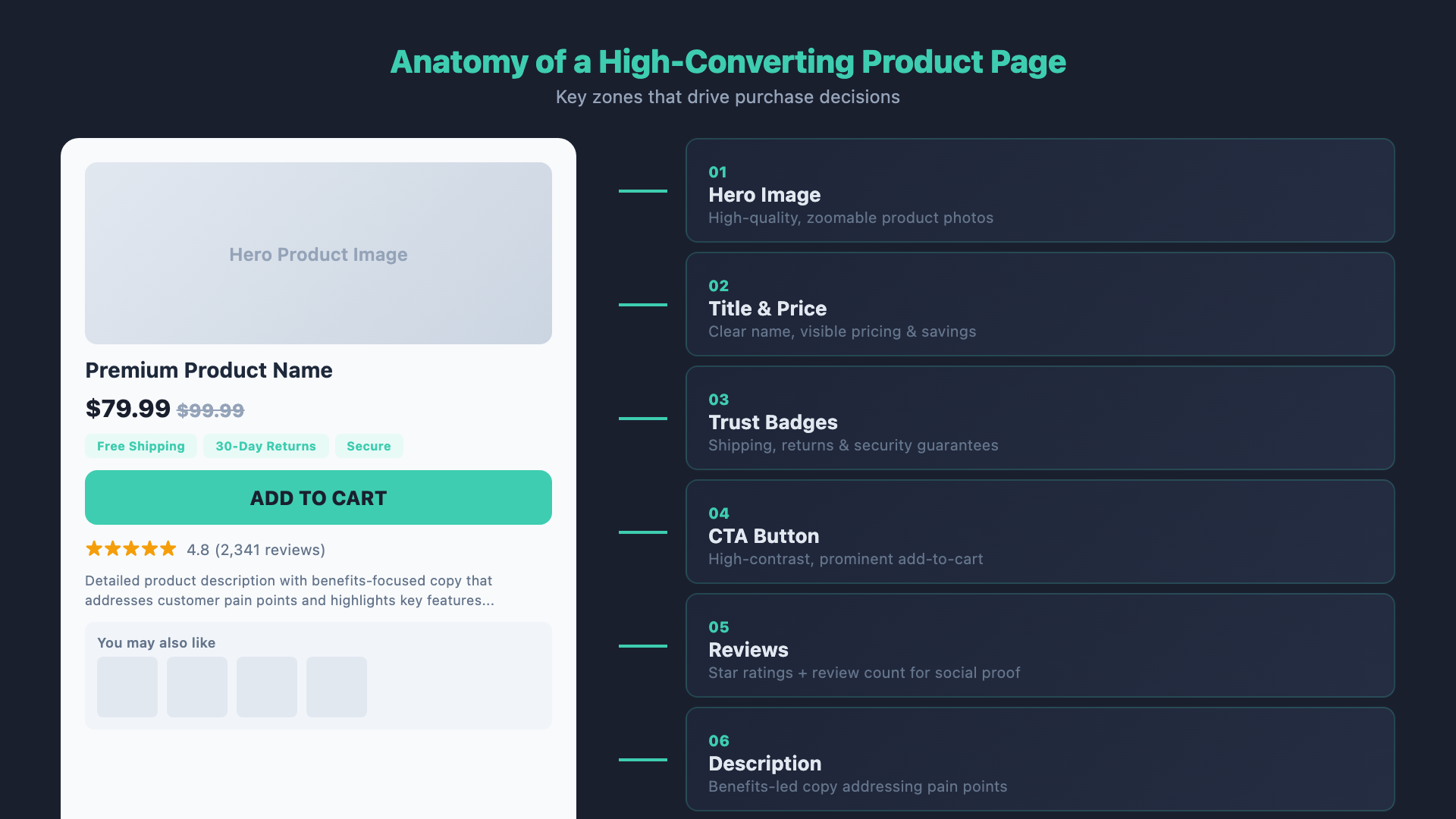
- Write Benefit-Driven Product Descriptions
- Display Star Ratings Above the Fold
- Add Trust Badges Near the CTA
- Show Clear Pricing with Savings
- Create Urgency Without Being Fake
- Optimize Your Add-to-Cart Button
- Display Shipping Info Before Checkout
- Use Social Proof Beyond Reviews
- Add a Sticky Add-to-Cart on Mobile
- Enable Product Questions & Answers
- Cross-Sell and Upsell Intelligently
- Optimize for Mobile First
- Include a Clear Return Policy
- A/B Test Everything
1. Use High-Quality Product Images (Multiple Angles + Zoom)
Online shoppers cannot touch, feel, or try your product. Your images carry the entire burden of replicating the in-store experience. According to Shopify’s ecommerce research, 75% of online shoppers rely on product photos when deciding whether to buy. Salsify reports that 76% of consumers say they need to see at least three product images before making a purchase.
Here is what an optimized product image gallery looks like in 2026:
- Minimum 5–8 images per product. Include front, back, side, close-up detail, and at least one lifestyle or in-context shot. Products with 5+ images see up to 58% more engagement than those with a single image.
- High resolution with pinch-to-zoom. Images should be at least 2000×2000 pixels so customers can zoom in and inspect details. Baymard’s UX research found that 56% of users immediately attempt to zoom when they arrive on a product page.
- Lifestyle and in-context photography. Show the product being used in real life. A pair of running shoes photographed on a runner communicates fit, scale, and identity far better than a white-background studio shot alone.
- Product video. Short product videos (15–60 seconds) can increase conversion rates by up to 80%, according to Wyzowl data. Use them to show the product in motion, demonstrate functionality, or highlight texture and materials.
- Consistent backgrounds and lighting. Maintain uniform styling across your product catalog. Visual inconsistency creates a subconscious sense that the store is unprofessional or untrustworthy.
Pro tip: Use WebP or AVIF image formats to deliver high-quality visuals without bloating page load times. A product page that loads in 1 second converts 2.5x more than one that loads in 5 seconds (Portent, 2023).
2. Write Benefit-Driven Product Descriptions
Most product descriptions read like spec sheets. Dimensions, materials, model numbers — all useful, but none of it answers the question your customer is actually asking: “What will this do for me?”
The difference between features and benefits is the difference between “600-denier polyester fabric” and “built to survive years of daily commuting without fraying or tearing.” Features describe the product. Benefits describe the customer’s life after buying it.
Here is how to structure a high-converting product description:
- Lead with the primary benefit. Open with a one- or two-sentence statement about the transformation or outcome the product delivers. This is what hooks the reader.
- Use a scannable format. Nielsen Norman Group research consistently shows that 79% of web users scan rather than read. Use bullet points, short paragraphs, and bold key phrases.
- Include a “Features & Specs” section separately. Give detail-oriented shoppers the technical specs they want, but keep it secondary to the benefits-first narrative.
- Address objections directly. If a common concern is durability, weight, or compatibility, answer it in the description. Every unanswered question is a reason to leave.
- Use sensory and specific language. “Butter-soft leather” outperforms “high-quality leather.” Specificity builds trust because it signals firsthand knowledge of the product.
Ecommerce product page optimization starts with copy that sells, not just informs. If your descriptions are generated by AI with no editing, you are almost certainly underperforming. AI can draft, but human judgment and brand voice produce descriptions that convert.
3. Display Star Ratings Above the Fold
Star ratings are one of the most powerful conversion levers on any product page — but only if shoppers can see them without scrolling. Research from the Spiegel Research Center at Northwestern University found that displaying reviews can increase conversion rates by up to 270% for higher-priced products.
Key principles for star rating placement:
- Place the star rating directly below the product title. This is the universal convention, and deviating from it creates friction. Users expect to see it there.
- Show the number of reviews alongside the stars. “4.7 stars” is good. “4.7 stars (2,341 reviews)” is significantly more persuasive. Volume signals reliability.
- Understand the threshold effect. Products with at least 5 reviews see a measurable lift. The impact grows substantially at 20+ reviews and continues to compound. However, a perfect 5.0 rating can actually reduce trust — it appears too good to be true. The conversion sweet spot is between 4.2 and 4.7 stars.
- Make the rating clickable. Link it to the reviews section lower on the page. This serves two purposes: it lets interested buyers read full reviews, and it adds an interactive element that keeps users engaged on the page.
If you are just launching a product and have zero reviews, consider an early-access program or post-purchase email sequence to generate your first batch. Tools like Yotpo, Judge.me, and Okendo make review collection straightforward.
4. Add Trust Badges Near the CTA
Trust badges — those small icons for security seals, payment methods, guarantees, and certifications — can feel like visual clutter. But the data is clear: they work. A CXL Institute study found that trust badges placed near the buy button increased conversions by 32% in tested scenarios.
The key is choosing the right badges and placing them correctly:
- Security seals (SSL, Norton, McAfee). These matter most for first-time visitors and lesser-known brands. They reassure shoppers that their payment information is safe.
- Payment method icons. Displaying Visa, Mastercard, PayPal, Apple Pay, and Shop Pay logos signals convenience and legitimacy simultaneously.
- Money-back guarantee badges. A “30-Day Money-Back Guarantee” badge near the Add to Cart button reduces perceived risk more effectively than a guarantee buried in your return policy page.
- Free shipping badges. If you offer free shipping (even conditionally), make it visible at the point of purchase decision.
Placement matters enormously. Trust badges placed in the footer have minimal impact. Badges placed directly below or beside the Add to Cart button — within the visual decision zone — are where the conversion lift happens. Think of it this way: the trust signal needs to be visible at the exact moment the shopper is deciding whether to click.
5. Show Clear Pricing with Savings
Price ambiguity is a conversion killer. According to Baymard Institute, 18% of cart abandonments happen because users could not calculate the total cost upfront. Your product page design tips should start with transparent, well-formatted pricing.
- Strikethrough pricing. When a product is on sale, show the original price with a strikethrough next to the discounted price. This anchoring effect makes the deal tangible. “
$89.00$59.00” is more compelling than just “$59.00.” - Show percentage or dollar savings. “Save 33%” or “You save $30” removes the mental math and makes the discount feel real. Test which framing works better for your price points — higher-priced items tend to respond better to dollar savings, while lower-priced items benefit from percentage framing.
- Offer installment options. Buy-now-pay-later integrations like Klarna, Afterpay, and Shop Pay Installments can increase average order value by 20–30%. Display the installment amount prominently: “Or 4 interest-free payments of $14.75.”
- Include tax and shipping indicators. If your prices include tax, say so. If shipping is calculated at checkout, mention it. Surprises at checkout are the number one reason for cart abandonment.
The goal is zero ambiguity. The customer should be able to glance at the price area and understand exactly what they will pay, what they are saving, and whether flexible payment is available — all within 2 seconds.
6. Create Urgency Without Being Fake
Urgency works. A well-implemented urgency signal can increase conversions by 10–30%. But fake urgency — countdown timers that reset on refresh, fabricated “only 2 left” warnings, invented purchase notifications — erodes trust and can permanently damage your brand.
In 2026, consumers are savvier than ever. They open incognito tabs, check review sites, and compare across retailers. If your urgency is fabricated, they will notice.
Here is how to create genuine urgency:
- Real-time low-stock indicators. If you genuinely have 4 units left, show it. “Only 4 left in stock” is one of the most effective conversion triggers in ecommerce — but only when it reflects actual inventory. Connect these indicators to your real inventory management system.
- Genuine limited-time offers. Seasonal sales, flash sales, and limited-edition drops create authentic scarcity. Use countdown timers only when there is a real deadline, and never reset them.
- Shipping cutoff urgency. “Order within 2 hours 14 minutes for next-day delivery” is both urgent and useful. It gives the customer a reason to act now while providing genuinely helpful information.
- Seasonal relevance. “Perfect for summer — ships in time for Memorial Day weekend” ties the purchase decision to a real-world deadline the customer already cares about.
The rule of thumb: If you would be embarrassed to explain your urgency tactic to a customer face-to-face, don’t use it.
7. Optimize Your Add-to-Cart Button
The Add-to-Cart button is the most important interactive element on your product page. Yet many stores treat it as an afterthought — a small, muted button that blends into the page layout. The product page conversion rate hinges on this single element.
- Make it the most prominent element in the buy box. The Add-to-Cart button should be the largest, most visually distinct button on the page. Use a high-contrast color that stands out from your site’s palette. Testing consistently shows that buttons with strong contrast against the background outperform low-contrast alternatives by 20–40%.
- Size matters. On desktop, the button should be at least 44px tall and wide enough to fill the product info column. On mobile, it should span the full width of the screen in a sticky bar.
- Use clear, action-oriented micro-copy. “Add to Cart” remains the highest-converting label for most stores because it is universally understood. “Buy Now” can work for direct-checkout flows. Avoid clever labels like “Grab Yours” or “Get It” unless you have tested them thoroughly and confirmed they outperform.
- Add a secondary CTA. Below the Add-to-Cart button, include a “Buy Now” or “Buy with Shop Pay” button that takes the customer directly to checkout. This caters to high-intent buyers who want to skip the cart entirely.
- Provide visual feedback. When clicked, the button should visually respond — change color, show a checkmark, or display a brief confirmation. This reassures the customer that their action registered.
8. Display Shipping Info Before Checkout
Unexpected shipping costs are the number one reason for cart abandonment, cited by 48% of shoppers who abandon their cart (Baymard Institute, 2024). The solution is not necessarily free shipping — it is transparency.
- Free shipping thresholds. If you offer free shipping above a certain order value, display it prominently on the product page: “Free shipping on orders over $75.” Better yet, show how close the customer is: “Add $23 more for free shipping.”
- Estimated delivery dates. Replace vague shipping speed labels (“Standard: 5–7 business days”) with concrete dates: “Estimated delivery: March 12–14.” Amazon has trained consumers to expect delivery date estimates. Meeting that expectation builds confidence.
- Shipping cost calculator. If shipping costs vary by location, consider adding a zip-code-based estimator on the product page. This eliminates the “I’ll find out at checkout” uncertainty that causes shoppers to postpone or abandon.
- International shipping clarity. If you ship internationally, state it. If you don’t, state that too. International shoppers will spend time filling a cart only to discover at checkout that you do not ship to their country. That is a terrible experience.
The overarching principle of ecommerce product page optimization is to remove uncertainty. Shipping information is one of the biggest sources of uncertainty, and surfacing it early is one of the easiest wins available.
9. Use Social Proof Beyond Reviews
Star ratings and written reviews are essential, but they are only one form of social proof. In 2026, the most effective product pages layer multiple types of social validation to build a comprehensive trust narrative.
- User-generated photos and videos (UGC). Customer-submitted images of the product in real use are more persuasive than professional photos for many shoppers. Yotpo data shows that UGC on product pages increases conversion rates by up to 161%. Tools like Loox, Stamped, and Okendo make it easy to collect and display visual reviews.
- Real-time purchase notifications. “Sarah from Austin purchased this 12 minutes ago” — when based on real data — creates a sense of popularity and momentum. Use these sparingly and honestly.
- Total purchase or sales count. “Over 14,000 sold” is a powerful credibility signal. If your numbers are impressive, display them.
- Expert endorsements and press mentions. “Featured in Wirecutter” or “Dermatologist recommended” carry significant weight, especially for higher-consideration products. Display these as small badges or a dedicated “As Seen In” bar.
- Influencer and creator integrations. Embedding short-form video reviews from creators can bridge the gap between social media discovery and on-site conversion.
The principle behind effective social proof is simple: people trust other people more than they trust brands. Every piece of third-party validation you add to your product page reduces the perceived risk of buying.
10. Add a Sticky Add-to-Cart on Mobile
On mobile devices, once a user scrolls past the buy box, the Add-to-Cart button disappears. This is a critical problem because mobile shoppers frequently scroll down to read reviews, check sizing guides, or view additional images — and then have to scroll all the way back up to add the product to their cart.
A sticky Add-to-Cart bar solves this by keeping the purchase action always within reach. Data from conversion optimization platforms like Rebuy and ConvertCart shows that sticky Add-to-Cart bars can increase mobile conversion rates by 8–15%.
Best practices for sticky Add-to-Cart implementation:
- Show it on scroll. The sticky bar should appear only after the user scrolls past the original Add-to-Cart button. Showing it immediately when the page loads is redundant and wastes screen space.
- Include essential info. The sticky bar should contain the product name (abbreviated if needed), the price, and the Add-to-Cart button. Some implementations include a small product thumbnail — this is effective because it provides a constant visual reminder of what the shopper is considering.
- Keep it slim. The bar should take up no more than 60–70px of vertical space. Mobile screens are precious real estate, and a thick sticky bar that covers content creates frustration.
- Allow variant selection. If the product has sizes or colors, the sticky bar should either allow selection directly or scroll the user back to the variant picker when tapped.
If you are on Shopify, apps like Sticky Add to Cart by Starter and EasySticky offer plug-and-play solutions. For custom builds, this is a straightforward CSS and JavaScript implementation.
11. Enable Product Questions & Answers
A product Q&A section serves two powerful purposes: it addresses the specific concerns of hesitant buyers, and it generates long-tail SEO content that helps your product pages rank for question-based search queries.
- Reduces support load. When common questions are answered publicly on the product page, fewer customers need to email or chat with support before buying. This removes friction from the purchase path.
- Builds buyer confidence. Seeing that other customers had similar questions — and that the brand responded promptly and thoroughly — builds trust. It signals that the company stands behind its products and cares about its customers.
- SEO value. Q&A content is rich in natural language and long-tail keywords. A question like “Is this backpack big enough for a 15-inch laptop?” and its answer create indexable content that matches the way real people search. Over time, this can drive significant organic traffic to your product pages.
- Community engagement. Allow other customers to answer questions (moderated, of course). This creates a community dynamic and provides peer validation that is even more trusted than brand responses.
Amazon popularized the product Q&A format, and consumer expectations have followed. If your product page does not offer a way to ask questions, some percentage of shoppers will simply leave rather than hunt for your contact page.
12. Cross-Sell and Upsell Intelligently
Done well, cross-selling and upselling increase average order value without feeling pushy. Done poorly, they distract from the primary purchase and can actually decrease conversion rates. McKinsey estimates that 35% of Amazon’s revenue comes from its recommendation engine, which demonstrates the potential — but also the sophistication required to do it right.
- Relevance is everything. Cross-sell recommendations must be genuinely related to the product being viewed. Showing a phone case on a phone product page makes sense. Showing unrelated clearance items does not.
- Limit options. Hick’s Law tells us that the time it takes to make a decision increases with the number of choices. Show 3–4 cross-sell items, not 12. Excessive options create decision fatigue and can push the shopper off the page entirely.
- Position below the fold. Cross-sell and upsell sections should appear below the primary buy box and product details. They should supplement the purchase decision, not compete with it.
- Use “Frequently Bought Together” bundles. Bundled suggestions with a combined price (“Buy all three for $124 and save $18”) perform significantly better than individual product recommendations. They simplify the decision and create a clear value proposition.
- Upsell with care. Suggesting a premium version of the same product (“Upgrade to the Pro model for $20 more”) can increase AOV, but it must feel like a helpful suggestion, not a bait-and-switch. Present both options side by side with clear differences highlighted.
Tools like Rebuy, Nosto, and LimeSpot use AI-powered recommendation engines that learn from your store’s purchase data and serve increasingly relevant suggestions over time.
13. Optimize for Mobile First
Mobile commerce now accounts for over 60% of all ecommerce traffic and roughly 55% of revenue globally (Statista, 2025). Yet many stores still design their product pages for desktop first and then squeeze them onto mobile as an afterthought. This approach fails.
Mobile product page design tips that actually impact conversions:
- Tap targets of at least 48×48 pixels. Google’s mobile usability guidelines specify minimum touch target sizes. Buttons, links, and interactive elements that are too small create frustration and accidental taps — both of which kill conversions.
- Optimized image loading. Use responsive images with srcset attributes to serve appropriately sized images for each device. Lazy-load images below the fold. On mobile, every kilobyte matters — a 1-second delay in mobile page load time can reduce conversions by up to 20% (Google, 2023).
- Accordion-style product details. On mobile, long-form product descriptions, specifications, shipping info, and return policies should be collapsed into expandable accordion sections. This keeps the page scannable while making all information accessible.
- Thumb-friendly navigation. The most reachable areas on mobile are at the bottom center and middle of the screen. Place primary actions (Add to Cart, variant selection) in these zones. Avoid placing critical elements in the top corners where they require a stretch.
- Horizontal swipe for images. The product image gallery should use a swipeable carousel with clear dot indicators showing position. Pinch-to-zoom should be enabled and smooth.
- Minimize pop-ups. On mobile, intrusive interstitials (email capture pop-ups, cookie banners, chat widgets) can obscure the product and create a hostile first impression. Google also penalizes intrusive mobile interstitials in its search rankings.
Test your product pages on real mobile devices, not just browser dev tools. Emulators miss touch responsiveness, scroll behavior nuances, and real-world network conditions.
14. Include a Clear Return Policy
A visible, generous return policy is not a cost center — it is a conversion tool. Research from Narvar shows that 96% of consumers say they would shop with a retailer again based on a positive return experience, and 67% check the return policy before making a purchase.
- Surface the policy on the product page. Do not bury your return policy in a footer link that leads to a separate page. Include a brief, clear summary directly on the product page — either as a line of text near the Add to Cart button or in a collapsible section within the buy box area.
- Use plain language. “Free returns within 30 days, no questions asked” converts better than “Please refer to our comprehensive return and exchange policy for terms and conditions.” Legal jargon signals risk. Plain language signals confidence.
- Highlight what makes your policy generous. If you offer free return shipping, extended holiday return windows, or no-restocking-fee returns, these are competitive advantages — feature them prominently.
- The conversion impact is measurable. Stores that display a clear return policy on the product page typically see a 15–25% increase in conversion rate compared to those that hide or minimize it. The perceived risk reduction outweighs the slight increase in return volume.
Think of it from the customer’s perspective: buying online means committing money to something they have never seen in person. A clear, generous return policy transforms a risky purchase into a risk-free trial.
15. A/B Test Everything
Every product page best practice in this guide is backed by aggregate data. But aggregate data tells you what works on average. Your store, your audience, and your products are not average. The only way to know what works for you is to test.
A/B testing is the discipline that separates stores that grow from stores that guess. Here is how to approach it systematically:
- Start with high-impact elements. Test your Add-to-Cart button (color, size, copy) first. Then test image count and style, price presentation, and trust badge placement. These elements influence the primary conversion action and will produce the clearest results.
- Test one variable at a time. If you change the button color and the product description simultaneously, you will not know which change produced the result. Isolate variables for clean data.
- Ensure statistical significance. Most A/B tests need at least 1,000–2,000 conversions per variation to reach 95% statistical significance. Running a test for two days on a low-traffic page and declaring a winner is not testing — it is guessing with extra steps.
- Use proper tools. Google Optimize may be discontinued, but alternatives like VWO, Optimizely, AB Tasty, and Convert continue to offer robust testing capabilities. For Shopify stores, Neat A/B Testing and Shoplift are solid options built for the platform.
- Document and iterate. Keep a testing log that records every test, its hypothesis, the result, and the learning. Over time, this log becomes a proprietary playbook of what works for your specific store and audience.
- Test across devices. A change that lifts conversions on desktop may hurt conversions on mobile, and vice versa. Segment your results by device type to avoid misleading aggregate data.
Ecommerce product page optimization is not a one-time project. It is an ongoing discipline of testing, learning, and refining. The stores with the highest product page conversion rates are not the ones that followed a checklist once — they are the ones that test continuously.
The Product Page Audit Checklist
Use this checklist to quickly assess any product page against all 15 best practices. Print it, share it with your team, or use it as the starting point for your next conversion optimization sprint.
| # | Best Practice | Key Action | Done? |
|---|---|---|---|
| 1 | High-Quality Product Images | 5–8 images, zoom enabled, lifestyle shots, product video | ☐ |
| 2 | Benefit-Driven Descriptions | Lead with benefits, scannable format, address objections | ☐ |
| 3 | Star Ratings Above the Fold | Rating + review count below product title, clickable to reviews | ☐ |
| 4 | Trust Badges Near CTA | Security seals, payment icons, guarantee badge near Add to Cart | ☐ |
| 5 | Clear Pricing with Savings | Strikethrough, % saved, installment options visible | ☐ |
| 6 | Real Urgency Signals | Real inventory counts, shipping cutoffs, genuine limited offers | ☐ |
| 7 | Optimized Add-to-Cart Button | High contrast, large size, clear label, visual feedback | ☐ |
| 8 | Shipping Info on Product Page | Costs, delivery estimates, free shipping threshold shown | ☐ |
| 9 | Social Proof Beyond Reviews | UGC photos, purchase counts, expert endorsements, press logos | ☐ |
| 10 | Sticky Add-to-Cart on Mobile | Slim bar with product name, price, and CTA on scroll | ☐ |
| 11 | Product Q&A Section | Enable customer questions, respond promptly, leverage for SEO | ☐ |
| 12 | Intelligent Cross-Sell & Upsell | 3–4 relevant items, bundles, positioned below fold | ☐ |
| 13 | Mobile-First Optimization | 48px tap targets, responsive images, accordion details | ☐ |
| 14 | Clear Return Policy | Plain language summary on product page, near Add to Cart | ☐ |
| 15 | A/B Test Everything | Test CTA first, one variable at a time, reach significance | ☐ |
Frequently Asked Questions
What is a good product page conversion rate?
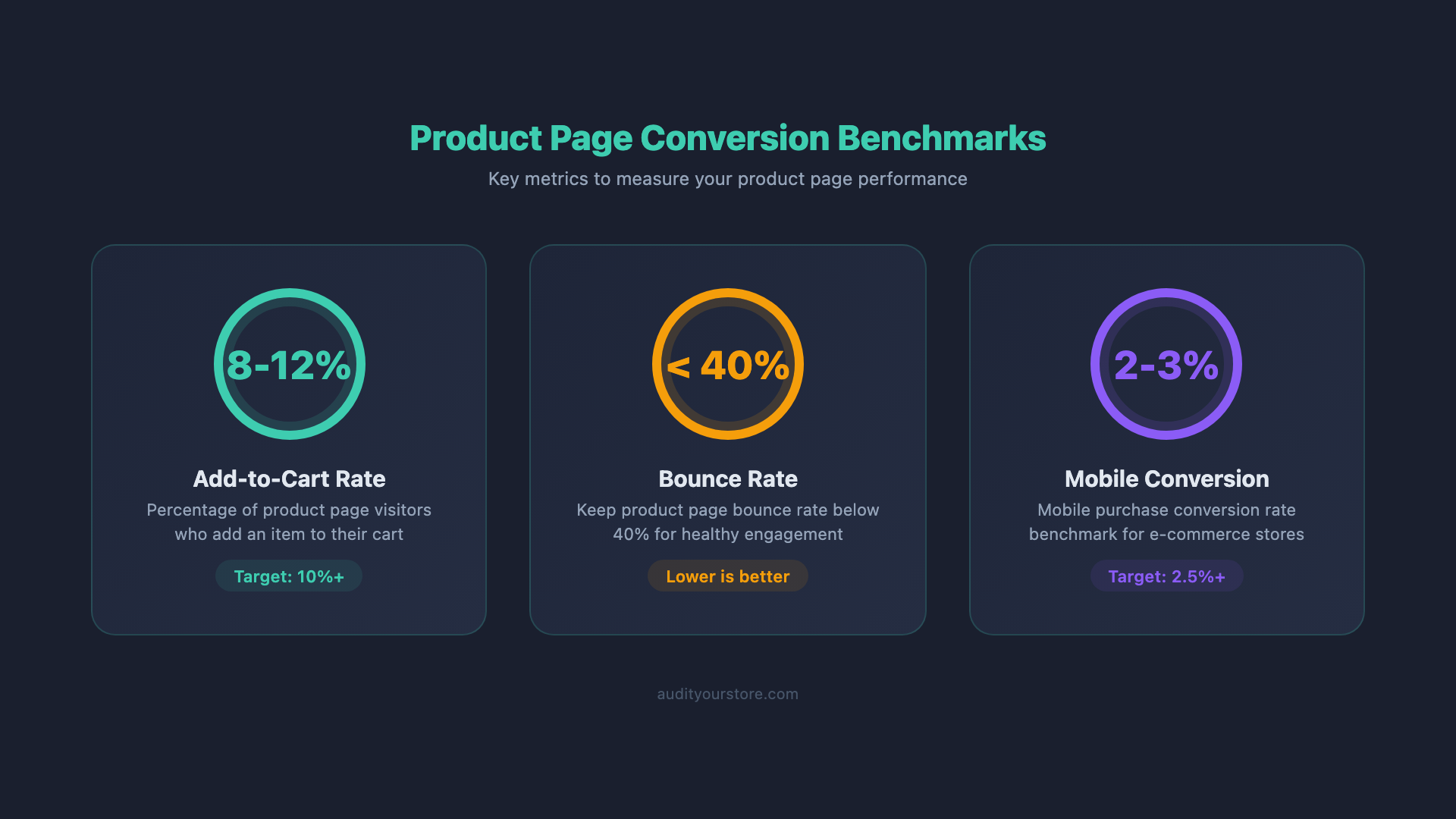
The average ecommerce product page conversion rate (product page to Add to Cart) sits between 3% and 5%, depending on the industry. Fashion and apparel tend to fall at the lower end (2–4%), while consumables and replenishment products can reach 6–8%. A well-optimized product page in most verticals should target at least a 4–5% add-to-cart rate. However, the more meaningful metric is your own improvement over time. If you are at 2.5% today and reach 4% after implementing these product page best practices, that is a 60% improvement in conversion performance — which translates directly to revenue.
How many product images should I have?
Aim for a minimum of 5 images per product, with 7–8 being the sweet spot for most categories. Include at least one pure white-background shot, two to three detail or angle shots, one to two lifestyle or in-context images, and one size-reference or scale image. For products where texture, weight, or movement matters (apparel, furniture, electronics), adding a short video can increase engagement and conversion rates by 20–80%. More is generally better until you cross approximately 10 images, at which point diminishing returns set in and page load concerns become relevant.
Should I show the product price above or below the fold?
Always above the fold. Price is one of the first things shoppers look for, and hiding it forces them to scroll, which creates friction. Baymard Institute’s usability studies consistently show that the ideal buy-box layout places the product title, star rating, price, variant selectors, and Add-to-Cart button all within the initial viewport on desktop. On mobile, the price should appear within the first scroll. Delaying price disclosure does not increase perceived value — it increases bounce rate.
Do trust badges really increase conversions?
Yes, but with important caveats. Trust badges are most effective for lesser-known brands, first-time visitors, and higher-priced products where the perceived risk of purchasing is elevated. For well-known brands with strong existing consumer trust (Nike, Apple, etc.), trust badges have a smaller incremental effect. The placement of trust badges matters as much as their presence — badges near the Add-to-Cart button and payment area outperform badges placed in headers, footers, or sidebars. The most effective badge types are money-back guarantees, secure checkout seals, and accepted payment method icons.
What should I A/B test first on my product page?
Start with the elements closest to the conversion action. The recommended testing priority is: (1) Add-to-Cart button design (color, size, copy), (2) product image count and type (studio vs. lifestyle), (3) price presentation (with or without anchoring, installment display), (4) social proof placement and format, and (5) product description structure (paragraph vs. bullet points, benefits-first vs. features-first). This order is based on the typical impact magnitude of each element. Button optimizations tend to produce results fastest because they directly affect the click action, while description changes may require longer tests to reach significance.
Stop Guessing. Start Auditing.
The 15 practices in this guide are a strong starting point — but they are just that. The 276-Point CRO Checklist includes 38 product page checkpoints alone, covering everything from image gallery UX and variant selector design to mobile scroll behavior, accessibility compliance, and advanced personalization triggers.
If your product pages are not converting the way they should, the checklist will show you exactly where the gaps are — and what to fix first.