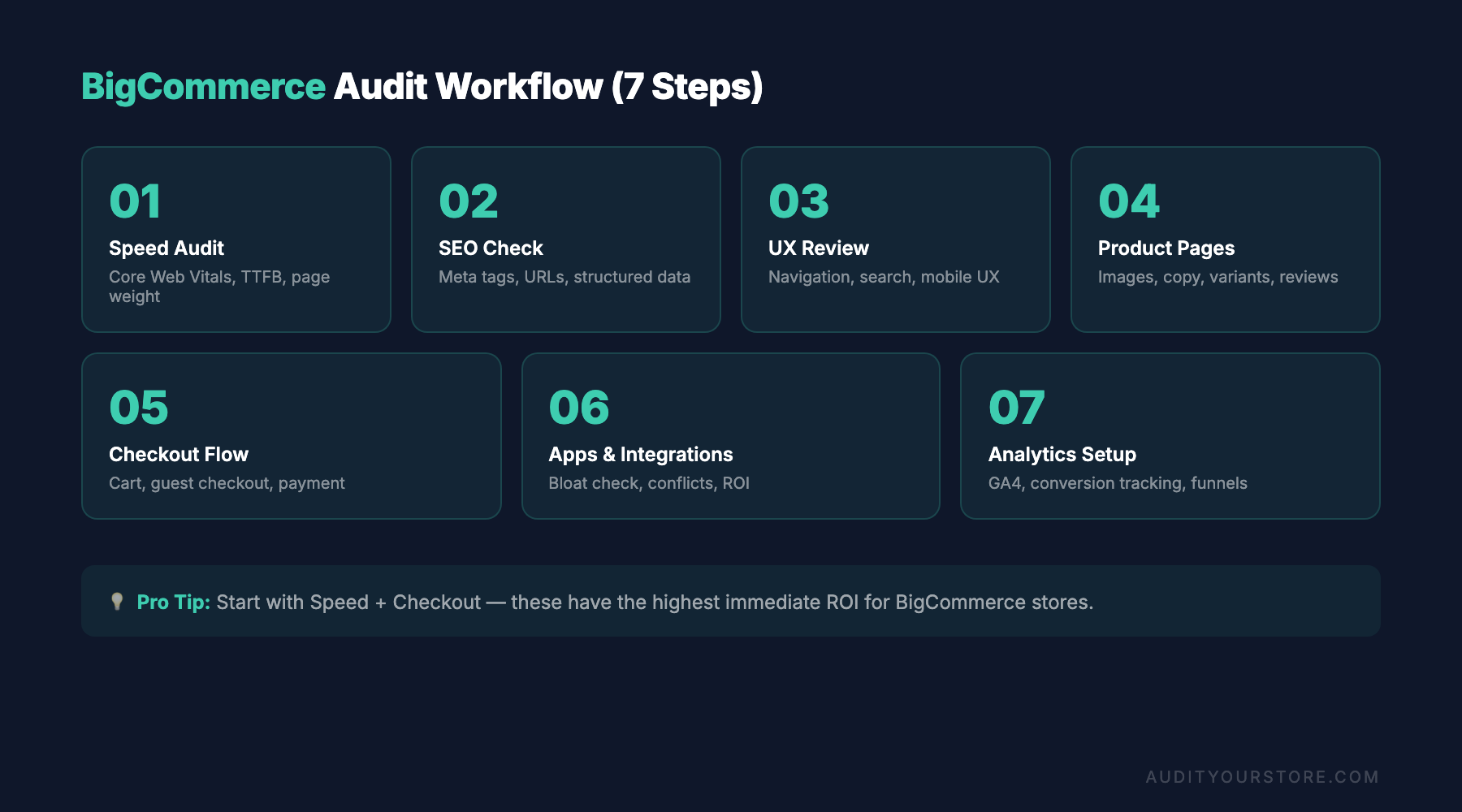
Running a BigCommerce store audit is one of the most effective ways to uncover hidden performance bottlenecks, conversion killers, and untapped revenue opportunities on your online store. Whether you launched your BigCommerce site last month or have been selling on the platform for years, a structured audit helps you evaluate every element that influences how visitors experience your store — and whether they ultimately buy.
BigCommerce powers over 60,000 active online stores worldwide, and its enterprise-grade feature set gives merchants robust tools out of the box. But having powerful tools and using them effectively are two very different things. Many store owners only scratch the surface of what BigCommerce offers, leaving significant performance and conversion gains on the table.
This guide walks you through a complete BigCommerce store audit checklist for 2026, covering everything from theme optimization and built-in feature configuration to checkout customization and analytics integration. If you have already completed a Shopify store audit guide or a WooCommerce audit checklist for stores on other platforms, you will find this BigCommerce-specific checklist complements those resources while addressing the unique strengths and quirks of the BigCommerce ecosystem.
Why a BigCommerce Store Audit Matters in 2026
The ecommerce landscape has shifted considerably. Consumers expect sub-two-second page loads, seamless mobile checkout, and personalized shopping experiences. Search engines reward sites that deliver on Core Web Vitals, and ad costs continue to climb — making every click more expensive and every conversion more valuable.
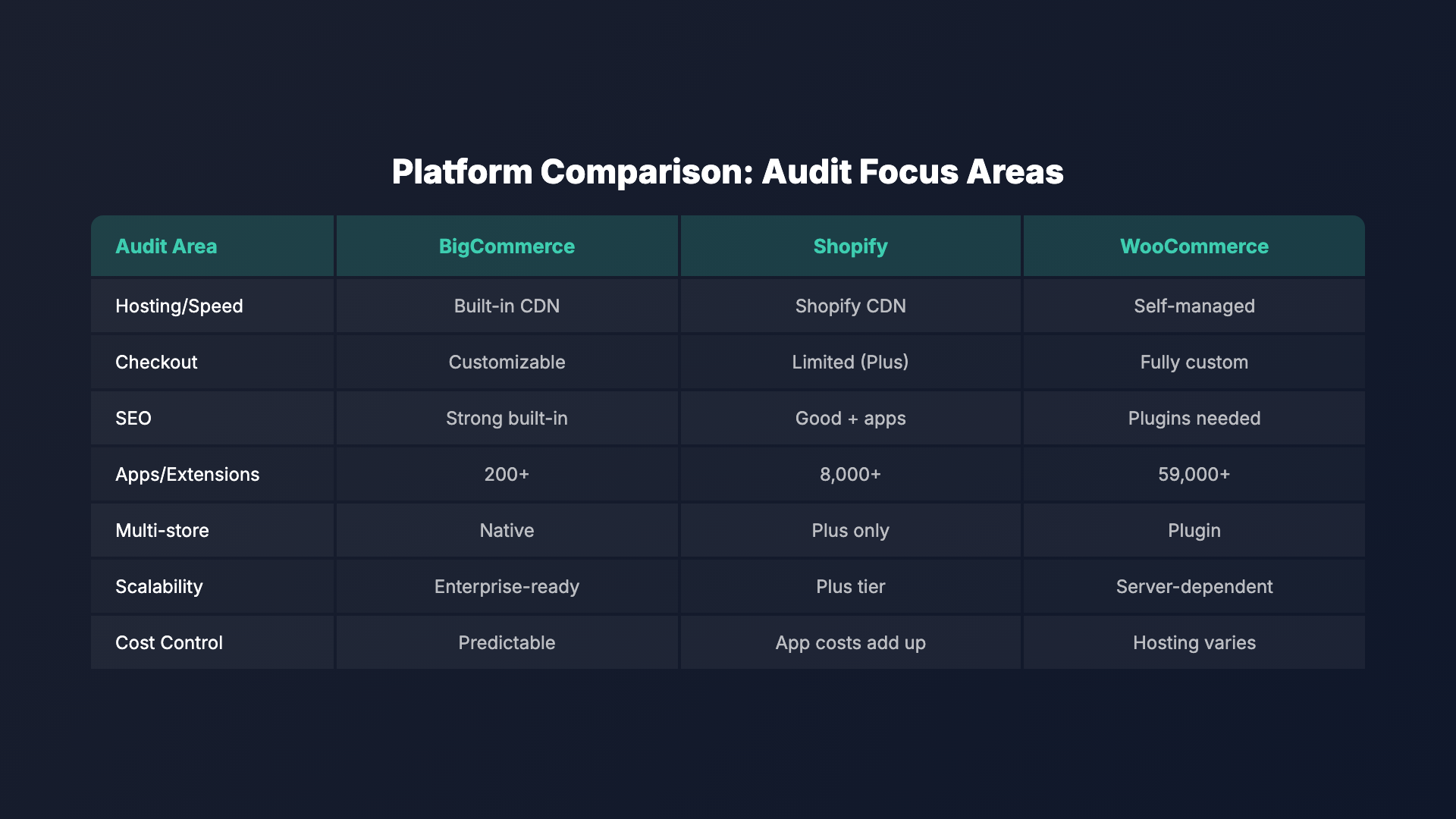
| Feature | BigCommerce | Shopify | WooCommerce |
|---|---|---|---|
| Hosting | Built-in CDN | Shopify CDN | Self-managed |
| Checkout customization | High | Limited (Plus) | Full control |
| Built-in SEO | Strong | Good + apps | Plugins needed |
| App ecosystem | 200+ | 8,000+ | 59,000+ |
| Multi-storefront | Native | Plus only | Plugin |
| Transaction fees | 0% | 0-2% | 0% (gateway fees) |
| Product variants | 600 | 100 | Unlimited |
A BigCommerce performance audit addresses all of these pressures simultaneously. Here is what a thorough audit helps you accomplish:
- Identify page speed issues that drive visitors away before they even see your products
- Evaluate conversion funnel leaks from homepage through checkout completion
- Assess SEO configuration to ensure BigCommerce’s built-in SEO tools are properly leveraged
- Review app stack efficiency to eliminate bloated or redundant third-party apps
- Benchmark against competitors to understand where your store stands in the market
- Uncover underused BigCommerce features that could boost conversions without any additional cost
Unlike Shopify, which charges extra for many advanced features unless you are on Shopify Plus, BigCommerce includes several enterprise-level capabilities — such as native multi-storefront support, price lists, and customer groups — in its standard plans. A proper audit ensures you are actually using what you are paying for.
A BigCommerce store audit is not a one-time event. The most successful merchants run quarterly audits to catch performance regressions, evaluate new platform features, and adapt to shifting customer expectations.
BigCommerce Theme Optimization: Speed, Structure, and Mobile Performance
Your theme is the foundation of your store’s user experience, and it is often the single biggest factor in page speed performance. BigCommerce themes built on the Stencil framework offer significant flexibility, but that flexibility can become a liability if themes are heavily customized without attention to performance.
Evaluating Your Current Theme
Start your BigCommerce theme audit by answering these fundamental questions:
- Are you running the latest version of your theme, or has it fallen behind on updates?
- How many custom modifications have been made to the base theme files?
- Does your theme use modern image formats like WebP and AVIF?
- Is the theme leveraging BigCommerce’s built-in lazy loading for images and iframes?
- Are JavaScript files deferred or loaded asynchronously where possible?
Run your homepage, a category page, and a product page through Google PageSpeed Insights to establish baseline scores. Pay particular attention to Largest Contentful Paint (LCP), Interaction to Next Paint (INP), and Cumulative Layout Shift (CLS) — these are the Core Web Vitals that directly impact your search rankings.
Common BigCommerce Theme Performance Issues
Through auditing hundreds of BigCommerce stores, several patterns emerge consistently:
- Unoptimized hero images: Many stores use full-width banner images that exceed 500 KB. Compress these to under 150 KB using modern formats without visible quality loss.
- Excessive Google Fonts: Loading multiple font families with numerous weights adds significant render-blocking time. Limit yourself to two font families and only the weights you actually use.
- Third-party script bloat: Every app you install can inject JavaScript into your storefront. Audit each script’s impact using Chrome DevTools’ Coverage tab.
- Unused CSS: Stencil themes often ship with CSS for features you may not use. Consider purging unused styles during your build process.
- Missing responsive image sizing: Ensure your theme uses BigCommerce’s built-in image resizing API to serve appropriately sized images for each viewport.
Mobile-First Assessment
With mobile commerce accounting for over 72% of ecommerce traffic in 2026, your mobile experience deserves special scrutiny. BigCommerce’s Stencil themes are responsive by default, but responsive does not automatically mean optimized. Check for:
- Touch target sizes of at least 48×48 pixels for buttons and links
- Properly sized product images in grid and list views on smaller screens
- Navigation menus that are easy to use with one hand on mobile devices
- Form fields that trigger the correct mobile keyboard type (numeric for phone numbers, email for email addresses)
- Content that does not require horizontal scrolling on any screen size
Auditing BigCommerce Built-In Features and Configuration
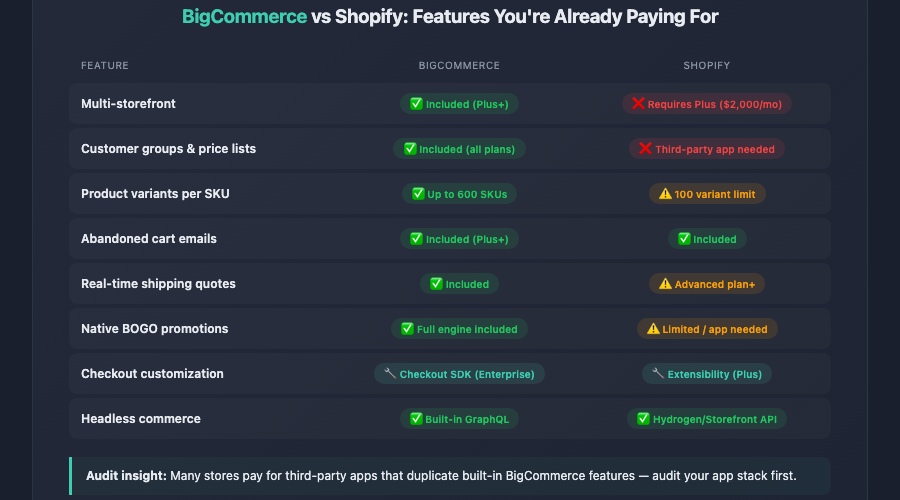
One of BigCommerce’s greatest advantages over competitors is its generous built-in feature set. However, many merchants either do not know these features exist or have not configured them properly. This section of your BigCommerce store audit focuses on the platform’s native capabilities.
Product Catalog Configuration
BigCommerce offers powerful product management features that directly impact conversions:
- Product variants and options: Ensure all variants are properly configured with accurate inventory tracking. BigCommerce supports up to 600 SKUs per product — far more than Shopify’s 100-variant limit — so take advantage of this for complex products.
- Custom fields: Use these to display specifications, certifications, or compatibility information directly on product pages without cluttering the main description.
- Price lists: If you serve different customer segments (wholesale, VIP, regional), verify that your price lists are correctly assigned to the appropriate customer groups.
- Product filtering: BigCommerce’s faceted search is a powerful conversion tool. Audit your filter setup to ensure relevant attributes (size, color, price range, brand) are enabled and ordered logically.
Customer Groups and Segmentation
BigCommerce’s native customer group functionality is something Shopify merchants need third-party apps to replicate. During your audit, verify that:
- Customer groups are properly defined for your business segments
- Category and product visibility rules align with your business strategy
- Group-specific pricing is accurate and competitive
- Shipping and payment method restrictions per group are functioning correctly
Multi-Storefront and Channel Configuration
If you are using BigCommerce’s multi-storefront capabilities (available on Plus plans and above), audit each storefront individually. Check that product catalogs, pricing, and design elements are correctly configured for each storefront. Verify that your channel manager integrations with marketplaces like Amazon, eBay, and social selling platforms are syncing inventory and orders properly.
BigCommerce App Ecosystem: Streamlining Your Tech Stack
The BigCommerce app marketplace has grown substantially, and it is easy to accumulate apps over time without evaluating their collective impact. A thorough BigCommerce app audit can reveal significant opportunities for improved performance and reduced costs.
Conducting an App Stack Review
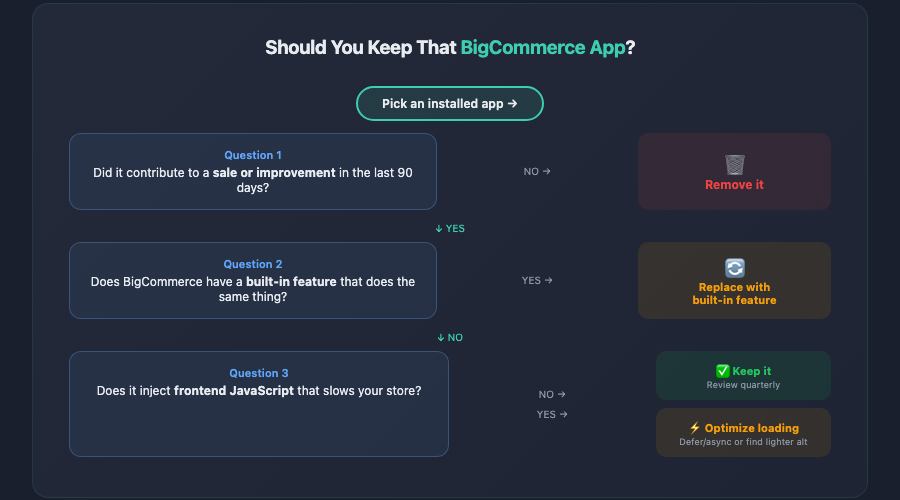
Create a spreadsheet listing every installed app with the following columns:
- App name and purpose: What does this app do?
- Monthly cost: What are you paying?
- Usage frequency: How often do you actively use it?
- Performance impact: Does it inject frontend scripts?
- Overlap: Does another app or a built-in BigCommerce feature do the same thing?
- Last updated: Is the app actively maintained by its developer?
Common areas where BigCommerce merchants have app redundancy include:
- Email marketing: Multiple email tools collecting subscriber data separately instead of through a single, unified platform
- Reviews: Running both a reviews app and a separate UGC platform when one solution could handle both
- SEO: Paying for SEO apps that duplicate functionality BigCommerce provides natively
- Analytics: Installing several analytics apps when a properly configured Google Analytics 4 setup with BigCommerce’s enhanced ecommerce tracking covers most needs
Evaluating App Performance Impact
For each app that injects frontend code, test your page speed with the app enabled and disabled. Some review widgets, chat tools, and personalization engines can add 1-3 seconds to page load times. The performance cost might be justified if the app drives significant revenue, but you need data to make that determination.
BigCommerce’s Script Manager (found under Storefront > Script Manager) gives you centralized control over third-party scripts. During your audit, ensure all scripts are correctly placed (header vs. footer), scoped to the right pages, and loading with the appropriate timing (async vs. defer).
A good rule of thumb: if an app has not directly contributed to a sale or operational improvement in the last 90 days, it is a candidate for removal. Every unnecessary app is adding code weight, potential security vulnerabilities, and subscription costs.
BigCommerce Checkout Customization and Conversion Optimization
The checkout is where revenue is won or lost, and BigCommerce offers several checkout configuration options that many merchants overlook. This part of your BigCommerce conversion audit focuses specifically on the purchase flow.
Optimized One-Page Checkout
BigCommerce’s Optimized One-Page Checkout is enabled by default on most plans, but its configuration matters enormously. Audit the following elements:
- Guest checkout: Is it enabled? Forcing account creation before purchase is one of the top reasons for cart abandonment. Enable guest checkout and offer account creation after the purchase is complete.
- Address autocomplete: BigCommerce integrates with Google Places for address autocompletion. Verify this is active — it reduces form friction and decreases address-related shipping errors.
- Payment methods: Audit your active payment gateways. BigCommerce supports over 65 payment gateways. Ensure you are offering the payment methods your target audience prefers, including digital wallets like Apple Pay, Google Pay, and PayPal.
- Express checkout options: PayPal One Touch, Amazon Pay, and other express checkout methods should be available on product pages and the cart page, not just at checkout.
- Shipping estimates: Verify that real-time shipping quotes are accurate and appearing at the right stage in the checkout flow.
Checkout Extensibility (Enterprise)
If you are on BigCommerce Enterprise, you have access to the Checkout SDK, which allows deep customization of the checkout experience. During your audit, evaluate whether your custom checkout modifications are:
- Functioning correctly across all browsers and devices
- Not introducing errors that increase abandonment
- Properly tracking checkout step completion in your analytics
- Aligned with current best practices for form design and user experience
Cart Abandonment and Recovery
BigCommerce includes built-in abandoned cart recovery emails (on Plus plans and above). Audit your abandoned cart saver configuration:
- Is the feature enabled and actively sending emails?
- What is the current recovery rate, and how does it compare to the industry average of 5-10%?
- Are your recovery emails personalized with the abandoned products?
- Have you tested different send timing (1 hour, 24 hours, 72 hours after abandonment)?
- Does your recovery email include a compelling reason to return, such as a limited-time discount or free shipping offer?
For merchants running a broader ecommerce CRO audit, the checkout and cart recovery analysis is often where the largest revenue gains are found. Small improvements in checkout completion rates compound quickly at scale.
BigCommerce SEO Settings: A Technical Audit Checklist
BigCommerce has historically offered strong built-in SEO capabilities, and the platform continues to improve in this area. However, default settings are not always optimal, and many merchants leave SEO performance on the table through misconfiguration.
URL Structure and Redirects
BigCommerce gives you control over URL structures for products, categories, and content pages. Audit the following:
- URL format: Ensure your URLs are clean and descriptive. BigCommerce allows you to remove the
/products/or/categories/prefix for shorter, more SEO-friendly URLs. - 301 redirects: Check that all old URLs properly redirect to current pages. BigCommerce automatically creates 301 redirects when you change a URL, but verify these are working — especially after bulk product imports or catalog restructuring.
- Canonical tags: BigCommerce automatically generates canonical URLs, but custom pages and filtered category views sometimes need manual canonical tag configuration to prevent duplicate content issues.
On-Page SEO Elements
Review these elements across a representative sample of your product pages, category pages, and content pages:
- Meta titles: Are they unique, under 60 characters, and containing relevant keywords? BigCommerce auto-generates these from product names by default, but manually crafted titles typically perform better.
- Meta descriptions: Are they compelling, under 160 characters, and written to encourage clicks from search results?
- Heading hierarchy: Does each page use a logical H1 through H3 structure? BigCommerce themes sometimes use headings for visual styling rather than semantic structure.
- Image alt text: Are product images using descriptive, keyword-relevant alt text? This is critical for both accessibility and Google Image search visibility.
- Structured data: BigCommerce automatically outputs product schema markup. Verify it is valid using Google’s Rich Results Test tool, and confirm that price, availability, and review data are accurately represented.
Technical SEO Considerations
BigCommerce handles many technical SEO elements automatically, but your audit should verify:
- XML sitemap: Accessible at
/xmlsitemap.phpand submitted to Google Search Console. Confirm it includes all important pages and excludes those you do not want indexed. - Robots.txt: BigCommerce generates this automatically. Review it to ensure important pages are not accidentally blocked from crawling.
- SSL certificate: Active and properly configured across all pages (BigCommerce provides this free).
- Page speed (again): Google has confirmed that page speed is a ranking factor. Your speed optimizations from the theme audit directly support your SEO performance.
- Mobile usability: Run the Mobile-Friendly Test on key page types to catch any mobile-specific issues.
Compared to WooCommerce, where SEO configuration requires plugins like Yoast or RankMath and significant manual setup, BigCommerce provides a more streamlined SEO experience out of the box. However, that convenience sometimes leads merchants to assume everything is handled automatically, when manual optimization still makes a substantial difference.
BigCommerce Page Builder and Content Strategy Audit
BigCommerce’s drag-and-drop Page Builder has matured significantly and is now a capable tool for creating high-converting landing pages, custom content pages, and enhanced category and product page layouts. Your audit should evaluate how effectively you are using this tool.
Homepage and Landing Page Assessment
Evaluate your homepage and key landing pages against these criteria:
- Value proposition clarity: Can a first-time visitor understand what you sell and why they should buy from you within five seconds?
- Visual hierarchy: Do your Page Builder layouts guide the eye toward key actions (shop now, browse categories, view promotions)?
- Content freshness: Are banners, promotions, and featured products current? Outdated seasonal promotions damage credibility.
- Call-to-action placement: Are CTAs visible without scrolling on both desktop and mobile viewports?
- Widget performance: Some Page Builder widgets (especially those pulling dynamic product data) can impact load times. Test pages with many widgets carefully.
Category Page Optimization
Category pages are often the highest-traffic pages on a BigCommerce store after the homepage, yet they receive the least optimization attention. Your audit should check:
- Whether category descriptions are present and contain relevant keywords (BigCommerce lets you place descriptions above or below the product grid)
- Product sort order defaults — are they set to what makes sense for your customers (bestselling, newest, price)?
- Products per page count — too few means excessive pagination, too many slows page load
- Filter visibility and usefulness on mobile devices
- Category image quality and consistency
Blog and Content Pages
BigCommerce includes a built-in blog, though it is more limited than WordPress’s content management capabilities. During your audit, assess whether:
- Your blog is actively maintained with fresh, relevant content
- Blog posts include internal links to product and category pages
- Blog post URLs, titles, and meta descriptions are optimized
- If your content needs outgrow BigCommerce’s native blog, consider whether a headless CMS integration would be worthwhile
Analytics Integration and Conversion Tracking Audit
You cannot improve what you do not measure. A BigCommerce analytics audit ensures your data infrastructure is sound, giving you reliable information to make business decisions.
BigCommerce Analytics Dashboard
BigCommerce provides built-in analytics covering orders, customers, marketing, and store performance. During your audit, verify that:
- You are regularly reviewing the built-in analytics dashboard (many merchants ignore it entirely)
- The Merchandising report is being used to identify top-performing and underperforming products
- The Abandoned Cart report is being monitored for trends in abandonment rate
- Customer acquisition data is helping inform your marketing spend allocation
Google Analytics 4 Configuration
BigCommerce offers native Google Analytics 4 integration with enhanced ecommerce tracking. This is one of the most commonly misconfigured elements we encounter during BigCommerce store audits. Verify the following:
- GA4 property is connected: Confirm the measurement ID is correctly entered in Settings > Analytics > Google Analytics.
- Enhanced ecommerce is enabled: This tracks product impressions, clicks, add-to-cart actions, checkout steps, and purchases. Without it, you are flying blind.
- Events are firing correctly: Use Google Tag Assistant or GA4’s DebugView to walk through a complete purchase flow and verify each event fires with the correct parameters.
- Conversions are configured: Ensure your purchase event is marked as a conversion in GA4, and set up any additional conversion events relevant to your business (newsletter signups, account creation, wishlist additions).
- Attribution settings: Review your GA4 attribution model to ensure it aligns with your marketing strategy and customer journey length.
Additional Tracking and Integrations
Beyond Google Analytics, audit your other tracking integrations:
- Facebook/Meta Pixel: Is it installed correctly and tracking all relevant events (ViewContent, AddToCart, Purchase)? Verify using the Meta Pixel Helper browser extension.
- Google Ads conversion tracking: If you run Google Ads, confirm that conversion tracking and remarketing tags are properly firing and reporting accurate revenue data.
- Server-side tracking: With increasing browser privacy restrictions and ad-blocker usage, consider whether server-side tracking (through BigCommerce webhooks and a server-side Google Tag Manager container) would improve your data accuracy.
- Heatmap and session recording tools: Tools like Hotjar or Microsoft Clarity provide qualitative data about how visitors interact with your store. If installed, verify they are capturing data on key pages and that you are regularly reviewing the recordings.
BigCommerce-Specific Conversion Features You Might Be Missing
This final section of the audit checklist focuses on BigCommerce features that are frequently underutilized but can have an outsized impact on conversion rates and average order value.
Promotions and Coupon Engine
BigCommerce’s built-in promotion rules engine is more powerful than what many merchants realize. Audit your current promotions setup and consider implementing:
- Automatic cart-level discounts: “Spend $100, get 10% off” promotions that apply automatically without coupon codes
- Buy-one-get-one (BOGO) offers: BigCommerce supports complex BOGO rules natively
- Free shipping thresholds: Set these based on your average order value data to encourage larger orders
- Stacked promotions: BigCommerce allows multiple concurrent promotions with priority rules — ensure these are not conflicting or creating unintended discounts
- Customer group-specific promotions: Target promotions to specific customer segments for more personalized offers
Product Merchandising Tools
BigCommerce provides several built-in merchandising features that can boost conversions:
- Related products: Are these configured manually with strategic cross-sells, or are you relying on auto-generated suggestions that may not be relevant?
- Product pick lists and bundles: Use these to create product bundles and increase average order value without needing a third-party app.
- Product comparison: This native feature is especially valuable for stores selling technical products where customers need to evaluate specifications side by side.
- Wishlists: Ensure the wishlist feature is enabled and that you have a strategy for re-engaging customers who save products but do not purchase.
Trust and Social Proof Elements
Evaluate how your store builds trust throughout the customer journey:
- Are customer reviews displayed prominently on product pages?
- Do you have trust badges (secure checkout, money-back guarantee, free returns) visible near the add-to-cart button and at checkout?
- Is your shipping and returns policy easy to find and clearly written?
- Are you leveraging BigCommerce’s built-in product review system, or have you integrated a more feature-rich solution like Yotpo or Judge.me?
Site Search Optimization
BigCommerce includes built-in site search, but its effectiveness varies significantly based on configuration:
- Test common search queries your customers use and evaluate the relevance of results
- Review your search analytics to identify popular queries that return zero or poor results
- Consider whether BigCommerce’s native search meets your needs or if a third-party solution like Searchspring or Algolia would provide a better experience
- Ensure your search bar is prominently placed and easy to access on mobile
For a deeper dive into conversion optimization tactics that apply across all ecommerce platforms, our 276-point CRO checklist covers every touchpoint in the customer journey from first impression to post-purchase follow-up.
Key Takeaways
Completing a thorough BigCommerce store audit requires examining multiple interconnected systems — from your theme and page speed to your checkout flow and analytics tracking. Here are the essential points to take away from this guide:
- Start with performance. Theme optimization and page speed improvements have a cascading positive effect on SEO, user experience, and conversion rates. Fix your foundation first.
- Leverage what you are already paying for. BigCommerce includes powerful features like customer groups, price lists, multi-storefront support, and a robust promotions engine. Many merchants leave these unused while paying for third-party apps that replicate the same functionality.
- Audit your app stack ruthlessly. Every installed app has a cost — both the subscription fee and the performance overhead of additional JavaScript. Remove anything that is not actively contributing to revenue or operations.
- Do not neglect checkout optimization. Enable guest checkout, offer multiple payment methods including digital wallets, and configure your abandoned cart recovery emails. Small improvements here translate directly to revenue.
- Get your SEO fundamentals right. BigCommerce provides a solid SEO foundation, but manual optimization of meta titles, descriptions, URL structures, and structured data still makes a significant difference in search visibility.
- Fix your analytics before making changes. Ensure Google Analytics 4, enhanced ecommerce tracking, and all advertising pixels are correctly configured. Without reliable data, you are guessing — not optimizing.
- Make auditing a recurring practice. Schedule quarterly BigCommerce store audits to catch issues early, evaluate new features, and continuously improve your store’s performance and conversion rates.
A BigCommerce store audit is an investment in understanding your store as your customers experience it. The platform gives you the tools to build a high-converting, fast, and discoverable online store — but only a structured, systematic audit reveals whether you are using those tools to their full potential. Take this checklist, work through it methodically, and prioritize the changes that will have the greatest impact on your specific business goals.